logo elektroda
logo elektroda
X
logo elektroda
Dostępna jest polska wersja

Czy wolisz polską wersję strony elektroda?

Nie, dziękuję Przekieruj mnie tam

Is there a clock/calendar scheduler in OpenBeken? addClockEvent examples

ferbulous 4446 11
ADVERTISEMENT
  • #1 20546756
    ferbulous
    Level 18  
    Hi, is there a scheduler feature now?
    Or do I just add timers in the script
  • ADVERTISEMENT
  • #2 20546898
    p.kaczmarek2
    Moderator Smart Home
    Maybe the addClockEvent command can suit your needs?
    https://github.com/openshwprojects/OpenBK7231T_App/blob/main/docs/commands.md
    Helpful post? Buy me a coffee.
  • #3 20549517
    ferbulous
    Level 18  
    @p.kaczmarek2 thanks, looks like exactly what i need
    Any example with ntp server enabled?
  • #4 20549602
    p.kaczmarek2
    Moderator Smart Home
    We will be posting addClockEvent examples on our docs page (autoexec.bat examples section):
    https://github.com/openshwprojects/OpenBK7231T_App/blob/main/docs/autoexecExamples.md
    They are not there yet, but I will post them soon. Please remind me in 24 hours if I forget. Thanks!

    Added after 7 [hours] 30 [minutes]:

    addClockEvent demos added, open this:
    https://github.com/openshwprojects/OpenBK7231T_App/blob/main/docs/autoexecExamples.md
    and search for "addClockEvent".

    Tell me if there is anything more unclear or can I do something else for you?
    Helpful post? Buy me a coffee.
  • ADVERTISEMENT
  • #5 20767660
    salvoitaly
    Level 2  

    Hello p.kaczmarek2,

    I have the following problem with the Week's timer:

    When I add this timer:
    addClockEvent 12:00:00 0x16 1 power on
    the socket is switched on at 12:00 on Thursday.
    Everything is OK as far as it goes.

    If I insert this timer:
    addClockEvent 12:00:00 0x32 1 power on
    then this timer is also activated on Thursday.
    Why not Friday?
    Am I doing something wrong?

    Are these WeekDayFlags correct?
    Sunday = 0x01
    Monday = 0x02
    Tuesday = 0x04
    Wednesday = 0x08
    Thursday = 0x16
    Friday = 0x32
    Saturday = 0x64

    Thank you, and thank you for your very good work
  • #6 20767676
    p.kaczmarek2
    Moderator Smart Home
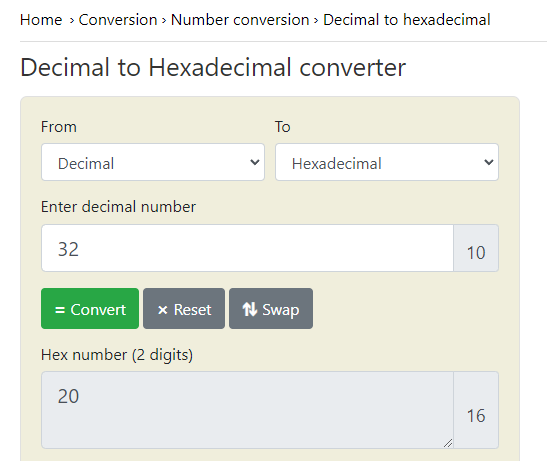
    You are using hexadecimal notation incorrectly. If you want to have decimal 32, please write:

    That is, 32 decimal is a 32 without any prefix.
    If you want to have hex 32, then you write:

    See:
    Screenshot of a decimal to hexadecimal converter with a result.
    Helpful post? Buy me a coffee.
  • ADVERTISEMENT
  • #7 20767702
    salvoitaly
    Level 2  
    Thank you very much.
    I thought I had made a mistake somewhere.

    Thank you
  • #8 21095381
    chabalalasmike
    Level 6  

    >>20767660

    little help here please...for all days is 0x7f or 0xff. What about mon-fri (weekdays excluding weekends)
  • ADVERTISEMENT
  • #9 21095451
    p.kaczmarek2
    Moderator Smart Home
    Each bit corresponds to each day, starting with Sunday, which is 1. So Monday is 2, Tuesday is 4, Wednesday is 8, Thursday 16, Friday is 32. So, if you want Monday to Friday, then calculate 2+4+8+16+32
    Helpful post? Buy me a coffee.
  • #10 21293852
    agarg
    Level 3  
    >>20767660 >>20767676

    I am a Noob. I flashed a switch with OpenBeken. It appears to work fine. Then I created this autoexec.bat but it is not functioning. Any pointers?
    
    // start NTP driver, so we have time from web
    startDriver NTP
    ntp_setServer 192.168.111.1
    ntp_timeZoneOfs -8
    //Show up in Windows Network
    startDriver SSDP
    // Reduce power usage and heating
    PowerSave 1
    // Wait for NTP to connect
    waitFor NTPState 1
    echo "NTP is ready"
    //
    addClockEvent 14:31:00 0x16 1 backlog power1 on; delay_s 100; power1 off;
    
  • #11 21293997
    p.kaczmarek2
    Moderator Smart Home
    We don't have delay support in backlog yet, you should use:
    
    // This aliased command will turn off relay on CH1 after 10 seconds
    // addRepeatingEvent	[IntervalSeconds][RepeatsOr-1][CommandToRun]
    alias turn_off_after_time addRepeatingEvent 10 1 power1 off
    alias do_cycle backlog power1 on; turn_off_after_time 
    addClockEvent 14:31:00 0x16 1 do_cycle 
    

    Test it by using "do_cycle" as a command, it should turn power 1 on, and then after 10 seconds turn it off. Once you are sure that "do_cycle" works, then you can use it in clock event. Check it step separately so you can tell what goes wrong.
    Helpful post? Buy me a coffee.
  • #12 21294481
    agarg
    Level 3  
    >>21293997
    I will try today. I just experimented with this and it appears to be working (gave two addclockevents):
    
    // start NTP driver, so we have time from Network Time Protocol (NTP) to synchronize the clocks 
    startDriver NTP
    // Configure a local NTP server on your LAN so that devices do not need to connect to the internet
    ntp_setServer 192.168.111.1
    // Set the local timezone as NTP server only provides UTC time
    ntp_timeZoneOfs -8
    // Setting the devices location will allow for calculating sunrise and sunset times
    ntp_setLatlong 38.42825889193605 -122.58791953325273
    //Show up in Windows Network
    startDriver SSDP
    // Reduce power usage and heating
    PowerSave 1
    // Wait for NTP to connect
    waitFor NTPState 1
    echo "NTP is ready"
    //
    //  Turn on at 03:00:00 every day (0xff)  {To be changed later to Sunday (0x01)}
    //addClockEvent 14:43:00 0x16 1 backlog power1 on; delay_s 100; power1 off;
    addClockEvent 08:15:00 0x7f   568 POWER ON
    addClockEvent 08:16:00 0x7f   569 POWER OFF


    Added after 2 [hours] 14 [minutes]:

    >>21294481
    Worked like a charm.
    In fact, for some reason, my earlier tries were sometimes not working.
    Will stick to this and its more elegant.

    Added after 1 [hours] 24 [minutes]:

    >>21095451

    are you saying:
    
    Every bit corresponds to a day
    00000001   Sunday
    00000010   Monday
    00000100   Tuesday
    00001000   Wednessday
    00010000   Thursday
    00100000   Friday
    01000000   Saturday
    Therefore Monday, Wed, and Sat is
    01001010  (Decimal: 74, Hexadecimal: 4A)
    expressed as 0x4a
    

Topic summary

✨ The OpenBeken firmware supports a scheduler feature via the addClockEvent command, allowing timed events based on clock and calendar inputs. Users can configure timers with specific times and weekday flags to control device actions such as power on/off. Weekday flags use bitmask values where Sunday=0x01, Monday=0x02, Tuesday=0x04, Wednesday=0x08, Thursday=0x10, Friday=0x20, and Saturday=0x40; for example, Monday to Friday is the sum of these bits (0x02+0x04+0x08+0x10+0x20=0x3E). Hexadecimal notation must be used correctly, distinguishing between decimal and hex values (e.g., 0x20 is hex for decimal 32). The addClockEvent command can be combined with aliases and addRepeatingEvent for complex timed sequences, as delay commands are not supported directly in backlog commands. NTP synchronization is recommended to maintain accurate time, with configuration examples including setting an NTP server, timezone offset, and latitude/longitude for sunrise/sunset calculations. Documentation and example scripts are available on the OpenBeken GitHub repository, including autoexec.bat examples demonstrating addClockEvent usage.
Generated by the language model.

FAQ

TL;DR: Yes—OpenBeken schedules with day‑bit masks; weekdays mask = 62 (0x3E). "Each bit corresponds to each day." Use these flags to build reliable timers and avoid hex/decimal mistakes. [Elektroda, p.kaczmarek2, post #21095451]

Why it matters: This FAQ helps OpenBeken users quickly create, debug, and verify weekly schedules with addClockEvent.

Quick Facts

Is there a scheduler in OpenBeken, or do I just add timers?

Yes. Use addClockEvent to schedule time-based actions. The project maintainer directed users to this command for scheduling needs and linked the reference documentation. It’s the canonical way to implement clock/weekly rules in OpenBeken scripts. [Elektroda, p.kaczmarek2, post #20546898]

How do weekday flags work in addClockEvent?

"Each bit corresponds to each day, starting with Sunday, which is 1." So Mon=2, Tue=4, Wed=8, Thu=16, Fri=32, Sat=64. Weekdays Mon–Fri total 62 (0x3E). All seven days total 127 (0x7F). This bitmask approach lets you combine any days you need in one schedule. [Elektroda, p.kaczmarek2, post #21095451]

Why did my Friday mask 0x32 also trigger on Thursday?

Because 0x32 is hexadecimal for decimal 50, which includes multiple bits. Friday is decimal 32 or hex 0x20. Using 0x32 inadvertently includes the Thursday bit (0x10) and more. Use 32 (decimal) or 0x20 (hex) to target only Friday. [Elektroda, p.kaczmarek2, post #20767676]

What mask enables Monday to Friday only?

Sum the weekday bits: 2 + 4 + 8 + 16 + 32 = 62. In hexadecimal, that is 0x3E. Use that as the second parameter in addClockEvent to schedule Monday through Friday only. [Elektroda, p.kaczmarek2, post #21095451]

What mask enables all days of the week?

Use all seven bits: 1 + 2 + 4 + 8 + 16 + 32 + 64 = 127. In hexadecimal that’s 0x7F. This enables Sunday through Saturday. [Elektroda, p.kaczmarek2, post #21095451]

How do I set up NTP so schedules fire on real time?

Enable NTP and wait for sync before adding events. How-To:
  1. startDriver NTP; set ntp_setServer and ntp_timeZoneOfs.
  2. waitFor NTPState 1 to confirm sync.
  3. Then addClockEvent lines. This ensures the device knows the correct clock before scheduling runs. [Elektroda, agarg, post #21293852]

My backlog with delay_s inside addClockEvent didn’t work. How do I add a delay?

Backlog currently lacks delay support. Use an alias that schedules a one-shot repeating event. Example: alias turn_off_after_time addRepeatingEvent 10 1 power1 off; alias do_cycle backlog power1 on; turn_off_after_time; then call do_cycle from addClockEvent. "We don’t have delay support in backlog yet." [Elektroda, p.kaczmarek2, post #21293997]

How can I sanity-check my schedule before relying on it?

Test the command chain by running the alias manually, then wire it into addClockEvent. For example, run do_cycle to verify ON happens now and OFF occurs after the delay. "Test it by using 'do_cycle' as a command" and add it to the clock event once verified. [Elektroda, p.kaczmarek2, post #21293997]

What time format does addClockEvent expect?

Use HH:MM:SS in 24-hour format, such as 14:31:00 or 12:00:00. Keep seconds explicit to avoid ambiguity and ensure precise triggers. [Elektroda, p.kaczmarek2, post #21293997]

Where can I find working addClockEvent examples for autoexec.bat?

Open the project’s autoexecExamples.md and search for “addClockEvent.” The maintainer added demos there specifically to illustrate scheduler usage. [Elektroda, p.kaczmarek2, post #20549602]

Can I schedule two actions one minute apart?

Yes. Add two addClockEvent lines one minute apart, for example 08:15:00 and 08:16:00, using your chosen day mask (e.g., 0x7F). A user demonstrated ON at 08:15 and OFF at 08:16 successfully. [Elektroda, agarg, post #21294481]

Can I trigger an alias directly from addClockEvent?

Yes. Define an alias (e.g., do_cycle) and use that alias name as the command in addClockEvent. This also enables delayed actions via addRepeatingEvent within the alias. [Elektroda, p.kaczmarek2, post #21293997]
Generated by the language model.
ADVERTISEMENT