


logo elektroda
logo elektroda
X
logo elektroda
Dostępna jest polska wersja

Czy wolisz polską wersję strony elektroda?

Nie, dziękuję Przekieruj mnie tam

[BK7231N] I'm thinking about adding sunrise and sunset to NTP events, anyone interested?

rickbronson 5934 60
Best answers

How can sunrise and sunset be added to NTP-based events in OpenBK7231N, and what is the right way to set it up?

Yes — sunrise and sunset can be added to NTP events, and the feature was eventually merged after testing [#20869378][#20906485] Use a single `ntp_setLatlong` command instead of separate latitude/longitude commands, and keep the code behind a `#define` in `obk_config.h`; if you want to avoid breaking config downgrades, do not add new config fields and use globals/statics set from `autoexec.bat` instead [#20819240][#20843876][#20846866] In `autoexec.bat`, start NTP, set the timezone and coordinates, then `waitFor NTPState 1` before creating `addClockEvent sunrise ...` and `addClockEvent sunset ...`, otherwise the events may be created before the timezone change has taken effect [#20823027][#20828244] The implementation was reported to be accurate to about ±1–2 minutes versus published sunrise/sunset times, which was considered acceptable [#20823018][#20869623] If you want a sunset delay like Tasmota’s civil sunset, the simplest workaround suggested was a one-shot `addRepeatingEvent` delay of 30 minutes after the sunset event, but it will not survive a reboot during that delay [#20879370]
Generated by the language model.
ADVERTISEMENT
  • #1 20819097
    rickbronson
    Level 3  

    I'm thinking about adding sunrise and sunset to NTP events, anyone interested? Attached is a patch that I haven't tried yet. Any feedback is greatly appreciated.

    Rick

    Attachments:
    • OpenBK7231N-diff-2.patch.zip (4.63 KB) You must be logged in to download this attachment.
  • ADVERTISEMENT
  • #2 20819101
    rickbronson
    Level 3  

    The format would be something like this:

    // Example: do event every Thursday at sunrise
    // addClockEvent sunrise 0x08 12 POWER OFF

    The code I used is borrowed heavily from Tasmota, hope there isn't any licensing issue.
  • #3 20819240
    p.kaczmarek2
    Moderator Smart Home
    Very good job, GPL license is okay. My only concern would be memory size, but we can put that in the obk_config.h as a conditional include. Can you open a pull request on Github so we can review it?

    On a code review side, I would suggest some little changes, for a start, I'd think it's better to merge ntp_setLatitude with ntp_setLongitude into one command, you know, we are limited by flash memory, there is no need for two separate command I think
    Helpful post? Buy me a coffee.
  • #4 20820503
    rickbronson
    Level 3  

    Okay, thanks for the feedback. I folded both latitude and longitude into one command. I was worried about code space too but was very surprised that the whole thing took less than 900 bytes (not counting any possible increase in math library use via all the trig functions it uses, like atanf, sinf, etc). I'll be testing it during the coming week, these kinds of things take a while to test :)

    Cheers,

    Rick
  • #5 20823018
    rickbronson
    Level 3  

    I've tested the sunrise/sunset algorithm with various cities around the world and it seems to be accurate within +-2 minutes. Not good enough for a space launch blastoff time but maybe good enough for us? There might be an issue with setting it up in the autoexec.bat however. Maybe you have an idea how to fix it. Seems like we might need a "set event when network is live after boot". Also might need to force NTP when the timezone is set instead of doing:

    Info:NTP:NTP offset set, wait for next ntp packet to apply changes

    The above message means that I can't do this in my autoexec.bat:

    PowerSave 1
    addRepeatingEvent 10 1 backlog startDriver NTP; ntp_timeZoneOfs -8; NTP_SetLatlong 44.002130 -123.091473; addClockEvent sunrise 0x7f 12 POWER OFF; addClockEvent sunset 0x7f 13 POWER ON

    Since the offset won't have taken place when I do "addClockEvent sunrise" and I could (potentially) be in the wrong timezone.

    Any ideas about fixing the above is greatly appreciated.

    Rick
  • #6 20823027
    p.kaczmarek2
    Moderator Smart Home
    Hello, are you aware about:
    
    waitFor NTPState 1
    

    style of syntax?

    See random sample script with waitFor here: https://www.elektroda.com/rtvforum/topic4011890-30.html#20822736

    EDIT: Altough.... your question may not be strictly related to that, maybe we just need to recalculate the time in-place at the time of command execution... idk, take OLD offset, subtract it from current time and add a new one...?

    Added after 44 [minutes]:

    EDIT: I did it:
    https://github.com/openshwprojects/OpenBK7231...mmit/55e6ca9ac6a5891470b145c015ee6f3094e6096b
    Helpful post? Buy me a coffee.
  • #7 20824823
    rickbronson
    Level 3  

    >> EDIT: I did it:

    Thanks for that! And for the "waitFor NTPState 1" tip. I'll give it a try.

    I've been seeing these happen randomly (in groups of 10):
    Info:NTP:NTP_CheckForReceive: Error while receiving server's msg

    Any ideas?

    BTW, my server is:

    Info:NTP:Server=217.147.223.78, Time offset=-28800
  • #8 20824897
    p.kaczmarek2
    Moderator Smart Home
    Why do you think it's a problem? I've a looked at code and it seems normal, it happens when recv fails. It's UDP, it's not reliable, it may fail to receive data sometimes.
    Helpful post? Buy me a coffee.
  • ADVERTISEMENT
  • #9 20828244
    rickbronson
    Level 3  

    >> Why do you think it's a problem? I've looked at the code and it seems normal, it happens when recv fails. It's UDP, it's not reliable, it may fail to receive data sometimes.

    I guess maybe I was misled by the "Error" in the message, to me "Error" means there is a problem. But before you change the message verbiage, I have some NTP poll suggestions:
    - increase NTP poll time from 1 minute to ~15 minutes, judging from info on the web 1 minute is too fast.
    - remove polling (and error msg) each second for 10 seconds if poll fails, just quietly wait until the next polling period. If it fails for 5 polls in a row, issue a warning.

    Added after 8 [minutes]:

    I've been testing the sunrise/sunset code and it seems to work well. I've attached a patch to version 1.17.308. Please tell me if there are any issues.

    Here is an example autoexec on how to use it:

    PowerSave 1
    startDriver ntp
    ntp_timeZoneOfs -8
    waitFor NTPState 1
    ntp_SetLatLong 44.002130 -123.091473
    addClockEvent sunrise 0x7f 12 POWER OFF
    addClockEvent sunset 0x7f 13 POWER ON
    Attachments:
    • OpenBK7231N-diff-7.patch.zip (5.29 KB) You must be logged in to download this attachment.
  • #10 20828276
    rickbronson
    Level 3  
    I have some unrelated questions:

    - Do you know where I can get a *real* BK7231N datasheet. The ones in the forum are helpful but not the real thing.
    - is there way to put pin config's into autoexec, I'm looking for a way to setup the entire config in one file.

    Oh and by the way, I made a mistake in the amount of added space for the sunrise/sunset, it's actually around 11k. Maybe some of that comes from the trig functions that are used. I got this number from looking at the .asm file ending address for 1.17.308 vs my mods.

    Thanks for all the help

    Rick
  • #11 20843843
    rickbronson
    Level 3  

    Did you get a chance to look at the patch? If you think the 11k is too much I could #ifdef it with a config setting.

    Rick
  • #12 20843876
    p.kaczmarek2
    Moderator Smart Home
    Sorry for the late reply. I've checked the code, it's good, but why are you adding new fields to config structure? If config size changes between versions, then downgrade will not be possible.
    If you really need to use config structure, maybe reuse those fields:
    Code: C / C++
    Log in, to see the code


    Or maybe just use global variables and expect user to set them in autoexec.bat every time?

    The BK7231 information on our forum is all we know.

    You can use setPinRole to set pins via autoexec.bat : https://github.com/openshwprojects/OpenBK7231T_App/blob/main/docs/commands.md

    All sunset/sunrise code should be within #define put in obk_config.h
    Helpful post? Buy me a coffee.
  • #13 20846823
    rickbronson
    Level 3  

    > Sorry for the late reply.
    No problem.

    > I've checked the code, it's good, but why are you adding new fields to the config structure? If the config size changes between versions, then downgrade will not be possible.
    > If you really need to use the config structure, maybe reuse those fields:
    > Code: c Expand Select all Copy to clipboard

    I did it that way because I thought it was the "right" way to do it. I don't really know this code that well, so how about you tell me the way you think it should be done, and I'll do it.

    > The BK7231 information on our forum is all we know.
    > You can use setPinRole to set pins via autoexec.bat: https://github.com/openshwprojects/OpenBK7231T_App/blob/main/docs/commands.md

    Thanks much for the info.

    > All sunset/sunrise code should be within #define put in obk_config.h

    Okay, I'll work on that.
  • #14 20846866
    p.kaczmarek2
    Moderator Smart Home
    If you are unsure about config save, then just let's use global variables and assume that it should be put in autoexec.bat and set on every startup that way
    Helpful post? Buy me a coffee.
  • #15 20851746
    omniron
    Level 11  
    Is sunrise and sunset working?
    Would be great!
  • #16 20851758
    p.kaczmarek2
    Moderator Smart Home
    Yes, what is the state of that? Can I merge?
    Helpful post? Buy me a coffee.
  • ADVERTISEMENT
  • ADVERTISEMENT
  • #18 20852637
    p.kaczmarek2
    Moderator Smart Home
    commands.md is autogenerated from JSON comments in code, do you have a Github account?
    Helpful post? Buy me a coffee.
  • #19 20852775
    omniron
    Level 11  

    Thank you Rickbronson for this!
    Wow that is 11K (byte?), sorry.
  • #20 20852974
    rickbronson
    Level 3  

    >>20852637
    I do have a GitHub account: github.com/rickbronson
  • #21 20853401
    p.kaczmarek2
    Moderator Smart Home
    Can you open a pull request with your code changes?
    Just move the variables from config to globals (or statics), and let's just assume they will be set every session through autoexec.bat
    Helpful post? Buy me a coffee.
  • #22 20854181
    rickbronson
    Level 3  

    Never done a git pull request but would like to try it. Before I do that, please take a quick look at the patch and see if you notice anything you'd like changed.
  • #23 20854213
    rickbronson
    Level 3  
    Here is the patch.
    Attachments:
    • OpenBK7231N-diff-9.patch.zip (7.2 KB) You must be logged in to download this attachment.
  • #24 20854291
    p.kaczmarek2
    Moderator Smart Home
    It's 99% okay and you can open pull request, however, I forgot to mention, that if you want to add autoexec to docs, you do not need to modify the MD file, you just modify the source json:
    https://github.com/openshwprojects/OpenBK7231T_App/blob/main/docs/json/autoexecExamples.json
    and put autoexec there:
    https://github.com/openshwprojects/OpenBK7231T_App/tree/main/docs/autoexecs
    then if you run:
    [BK7231N] I'm thinking about adding sunrise and sunset to NTP events, anyone interested?
    it will generate new MDs based on that info

    But again, it's not a problem, it's just documentation related, the code seems good now
    Helpful post? Buy me a coffee.
  • #25 20855621
    rickbronson
    Level 3  

    You'll have to excuse my ignorance of git. I've only used it a little. Here is what I get (on Debian):

    rick@laptop:~/boards/tuya-temp-humidity/OpenBK7231T_App$ git push -u origin sunevent_branch
    Username for 'https://github.com': rickbronson
    Password for 'https://rickbronson@github.com':
    remote: Permission to openshwprojects/OpenBK7231T_App.git denied to rickbronson.
    fatal: unable to access 'https://github.com/openshwprojects/OpenBK7231T_App/': The requested URL returned error: 403
    r
  • #26 20855929
    p.kaczmarek2
    Moderator Smart Home
    I haven't used git command line in a very long time, but don't you need first to push to your local cloned branch, like:
    
    https://github.com/rickbronson/OpenBK7231T_App/
    

    (I modified URL, so it's on your account now) and then open the pull request?

    These days I am using Github GUI 100% time, it is much easier, maybe you can try it out as well.
    Helpful post? Buy me a coffee.
  • #27 20856861
    rickbronson
    Level 3  

    Yeah, I tried the GUI first but found it very confusing.
    I went to: https://github.com/openshwprojects/OpenBK7231T_App/pulls
    and hit "New pull request" and then, very confusingly, it went to a "Compare changes" page. There was a "create pull request" on that page but it was grayed out. Here is the latest patch, just FYI

    Added after 1 [minutes]:

    Patch
    Attachments:
    • OpenBK7231N-diff-10.patch.zip (6.16 KB) You must be logged in to download this attachment.
  • #29 20859018
    p.kaczmarek2
    Moderator Smart Home
    Both Github GUI and Github itself should propose making you a pull request from your branch to parent repository, I think
    Helpful post? Buy me a coffee.
  • #30 20861889
    omniron
    Level 11  

    Does sunrise/set work? I can try it out if experimental

    Added after 1 [minutes]:

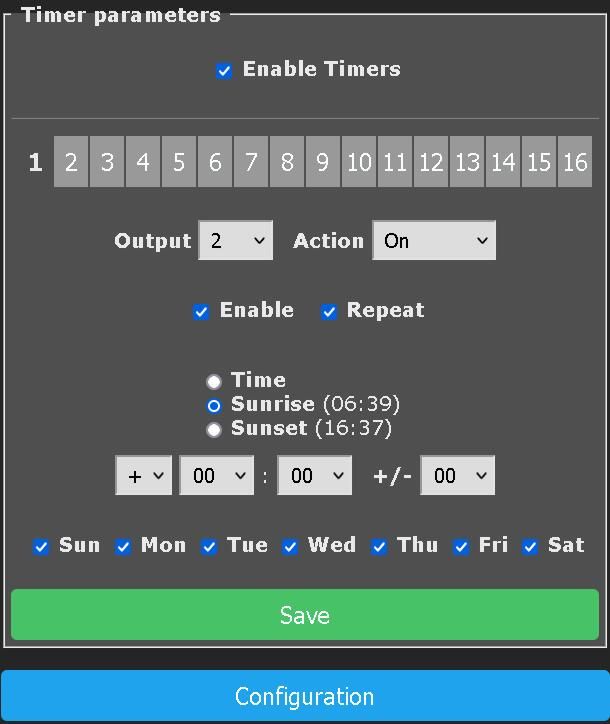
    Settings panel with options to enable timers and choose sunrise or sunset, along with save options.

Topic summary

✨ A feature to add sunrise and sunset events to NTP-based scheduling on BK7231N devices was proposed and developed, with code inspired by Tasmota and integrated into the OpenBK7231T_App firmware. The implementation includes commands to set latitude and longitude in a single command to save flash memory, and sunrise/sunset events can be added as clock events triggering device actions such as powering relays on or off. Testing showed the sunrise/sunset calculations are accurate within ±2 minutes globally. Challenges addressed include handling NTP synchronization timing, timezone offsets, and ensuring correct event triggering after device reboot or power outages. The code footprint increased by about 11 KB, mainly due to trigonometric calculations. The feature was merged into the main repository with ongoing improvements such as self-tests and documentation updates. Users shared example autoexec.bat scripts demonstrating how to configure the feature, including setting timezone, coordinates, and clock events for controlling lights. Discussions also covered handling manual overrides and state persistence across reboots using LFS commands. The feature is fully functional and available in the latest OpenBK7231T_App firmware, with additional pull requests extending functionality to expose next sunrise/sunset times as constants.
Generated by the language model.

FAQ

TL;DR: Field tests show the OpenBK sunrise/sunset scheduler stays within ±2 minutes of official tables ("good enough for us" [Elektroda, rickbronson, post #20823018]) and later self-tests cut the error to ±1 minute [Elektroda, p.kaczmarek2, post #20869623]

Why it matters: Accurate, timezone-aware switching lets IoT lights follow natural daylight without cloud services.

Quick Facts

Which firmware build includes the sunrise/sunset feature and how do I turn it on?

Pull Request #1001 merged into OpenBK v1.17.308; the code is wrapped in #define OBK_ENABLE_SUN_EVENTS inside obk_config.h. Re-compile with that flag set, or flash a nightly image after 2023-12-20 where the flag is already enabled [Elektroda, p.kaczmarek2, post #20869378]

How do I create a script that turns Relay 2 on at sunset and off at sunrise?

  1. Store the following as autoexec.bat.
  2. Replace the latitude, longitude, and ntp_timeZoneOfs with your own values.
  3. Reboot the module.

PowerSave 1
startDriver ntp
ntp_timeZoneOfs -8
ntp_SetLatlong 44.002130 -123.091473
waitFor NTPState 1
removeClockEvent 12; removeClockEvent 13
addClockEvent sunrise 0x7f 12 POWER2 OFF
addClockEvent sunset 0x7f 13 POWER2 ON
The waitFor line guarantees correct timezone before scheduling [Elektroda, p.kaczmarek2, post #20823027]

Can I delay the sunset action by 30 minutes to mimic civil twilight?

Yes. Inside the sunset handler, queue a one-shot repeating event:

addClockEvent sunset 0xff 21 backlog addRepeatingEvent 1800 1 POWER2 ON
1800 seconds = 30 minutes. Limitation: if the device reboots during the delay the queued event is lost [Elektroda, p.kaczmarek2, post #20879370]

Why do I keep seeing "NTP_CheckForReceive: Error while receiving" messages?

NTP uses UDP; occasional packet loss is expected. The driver polls every minute, retries ten times each second after a miss, then logs the error. "It’s normal, UDP is not reliable" [Elektroda, p.kaczmarek2, post #20824897] Failures clear automatically once the next valid packet arrives.

How can I preserve the correct ON/OFF state after a power outage?

At boot, compare $hour with $sunrise_hour and $sunset_hour. If current time is between sunset and sunrise, issue POWER2 ON; else POWER2 OFF. Save manual overrides with LFS_WriteStr and read them during boot to skip auto-correction when the user toggled the light [Elektroda, ilengyel, post #20971275]

Where can I get a complete BK7231N datasheet?

Only abridged documents are public. "The BK7231 information on our forum is all we know" [Elektroda, p.kaczmarek2, post #20843876] Full datasheets require NDA through Beken Corp.

What is the correct workflow for submitting code to OpenBK?

  1. Fork openshwprojects/OpenBK7231T_App on GitHub.
  2. Push your branch to your fork (git push origin my_branch).
  3. Click “Compare & pull request” to open a PR against the upstream repository. A direct push to upstream will fail with HTTP 403 [Elektroda, rickbronson, post #20855621]

Why was the BL602 target excluded from the sunrise/sunset commit?

BL602 lacks a hardware FPU; single-precision trig calls bloat code size and slow execution. The maintainer #ifdef-ed the feature to avoid >20 kB growth on that MCU [Elektroda, w2q, post #21389444] If you enable it, use fixed-point math or link a lightweight trig library.

What happens if I downgrade firmware after enabling sunrise/sunset?

If you stored coordinates in the config structure, older builds cannot parse the larger struct and may corrupt settings. Current code keeps coordinates in globals and expects them in autoexec.bat, so downgrades are safe [Elektroda, p.kaczmarek2, post #20846866]
Generated by the language model.
ADVERTISEMENT
