logo elektroda
logo elektroda
X
logo elektroda
Dostępna jest polska wersja

Czy wolisz polską wersję strony elektroda?

Nie, dziękuję Przekieruj mnie tam

TL;DR

  • LSC Smart LED E27 806 lumen (RGBCW) bulb from Action in France uses a BK7231T SoC with a BP5758D LED driver.
  • The BP5758D wiring maps P24 to clock (BP5758D_CLK) and P26 to data (BP5758D_DAT).
  • The correct channel order is BP5758D_Map 1 0 2 3 4, and the bulb cost about 8€.
Generated by the language model.
ADVERTISEMENT
📢 Listen (AI):
  • Hi,

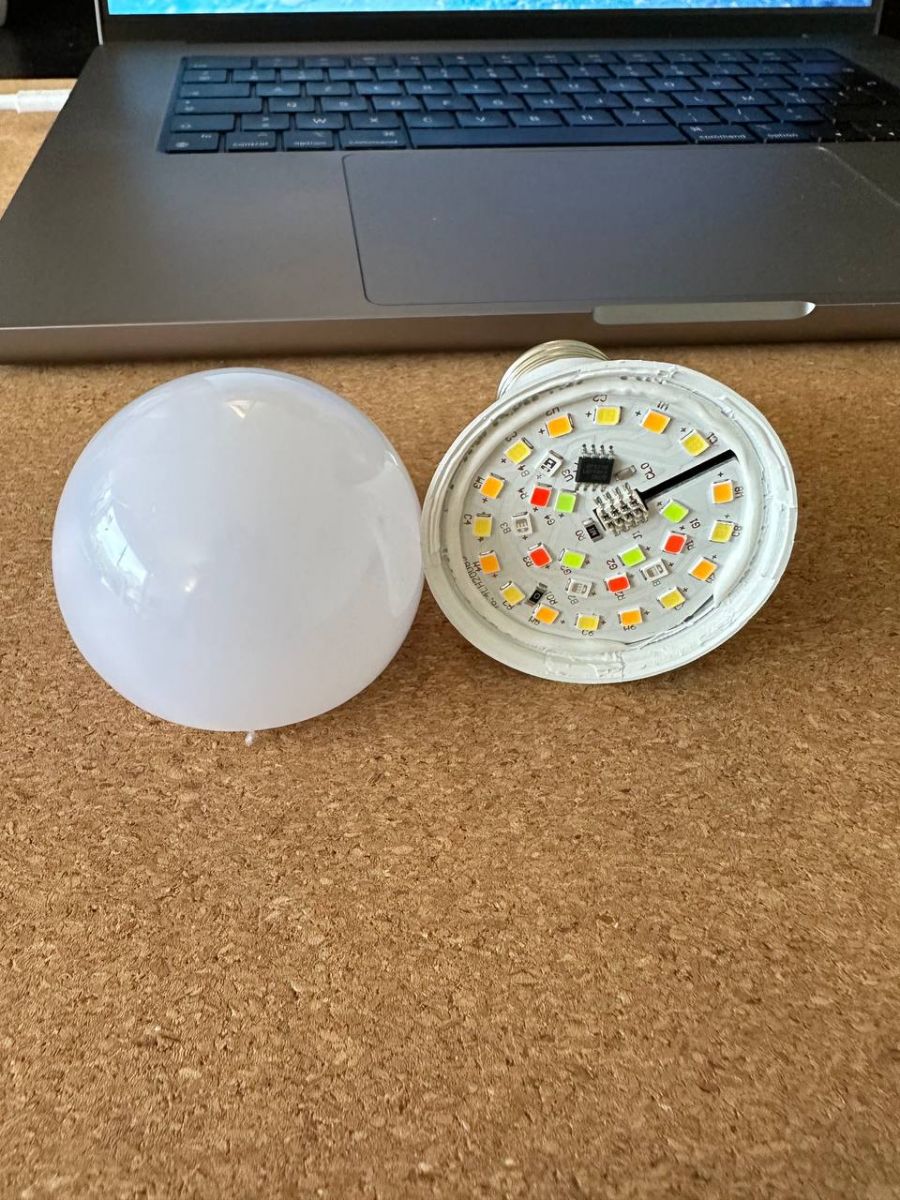
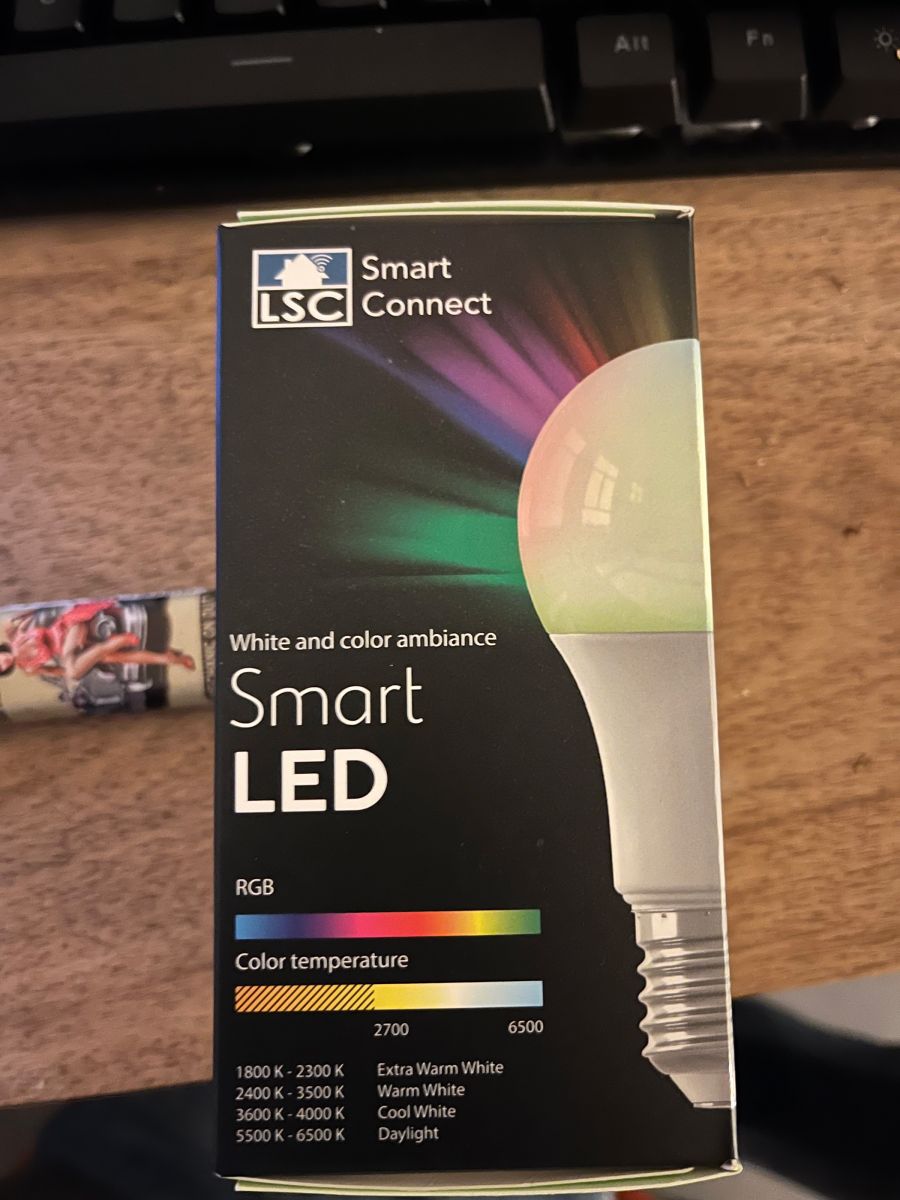
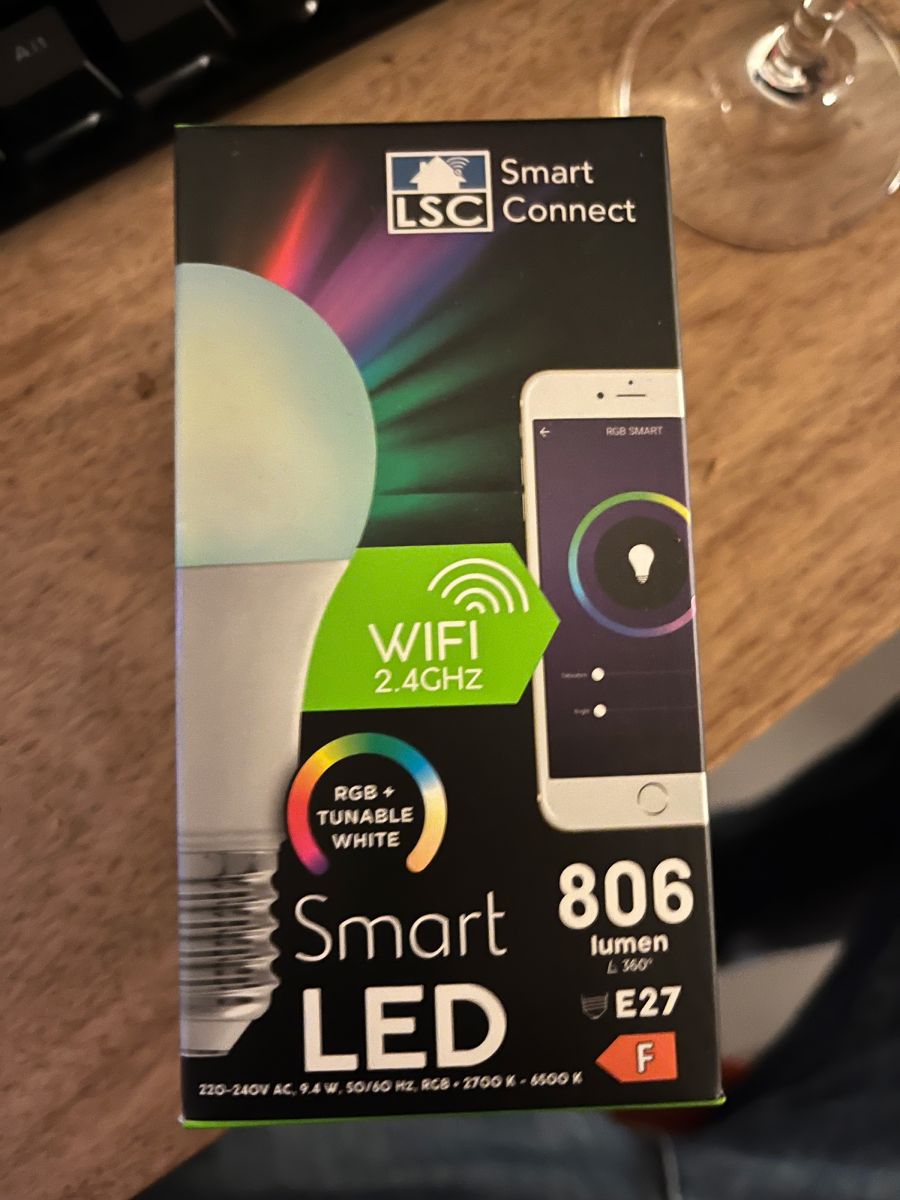
    I got this one for around 8€ at Action in France.

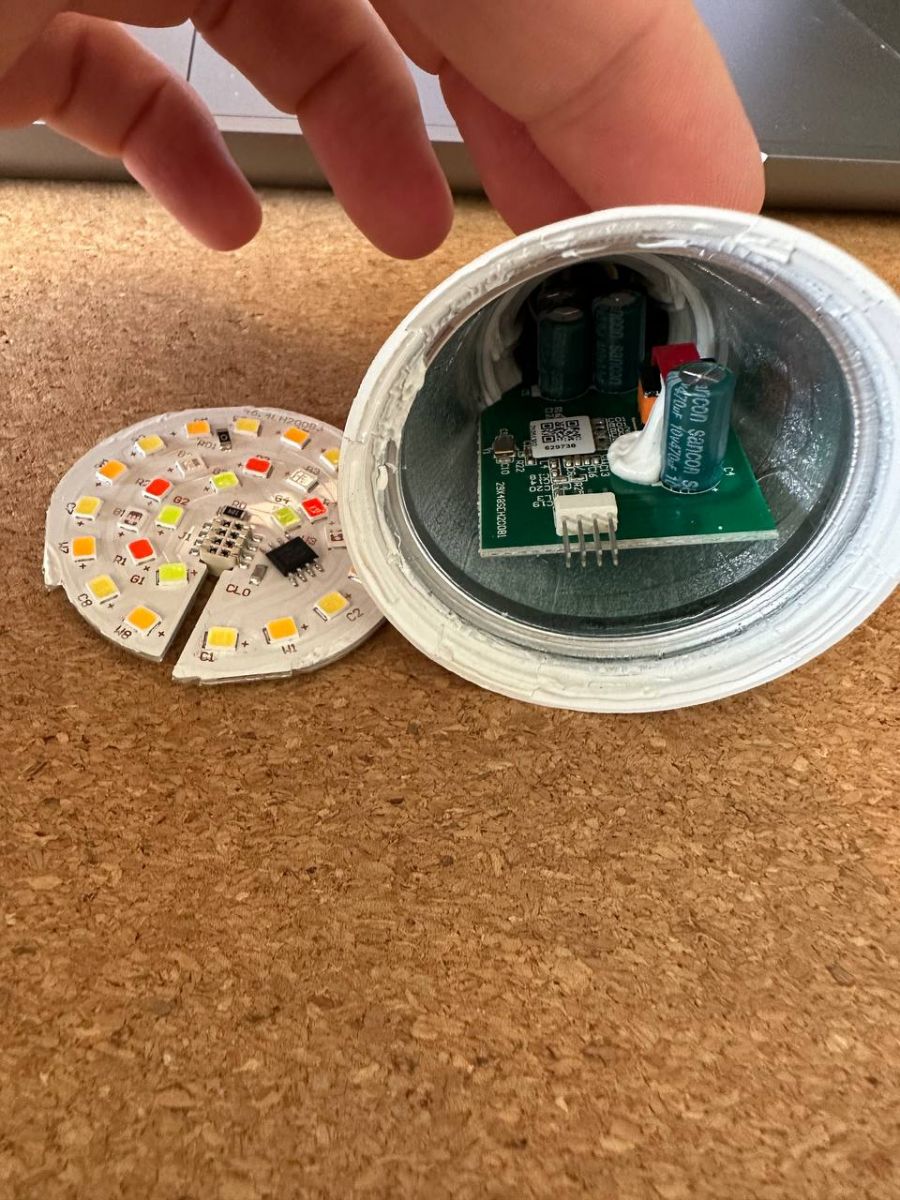
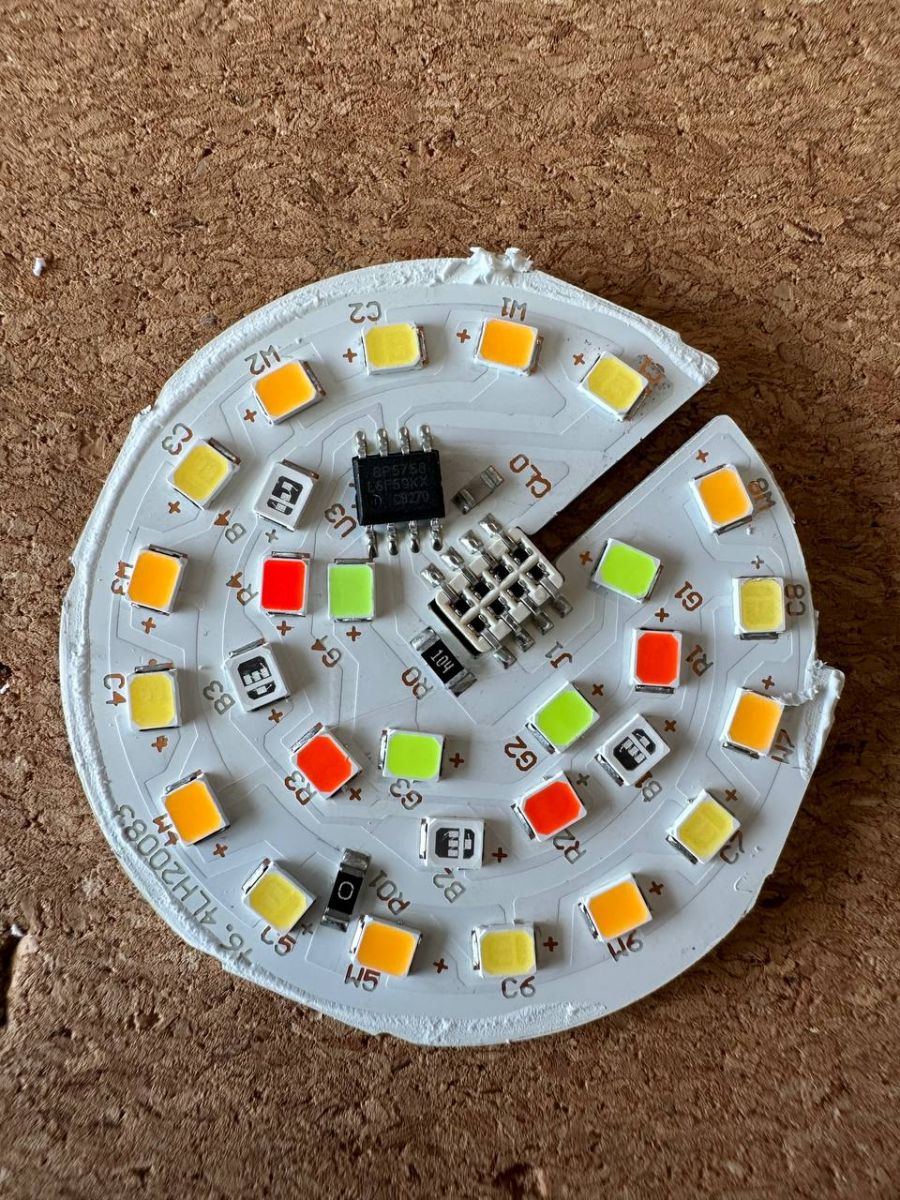
    The SOC used is a BK7231T with a BP5758D.

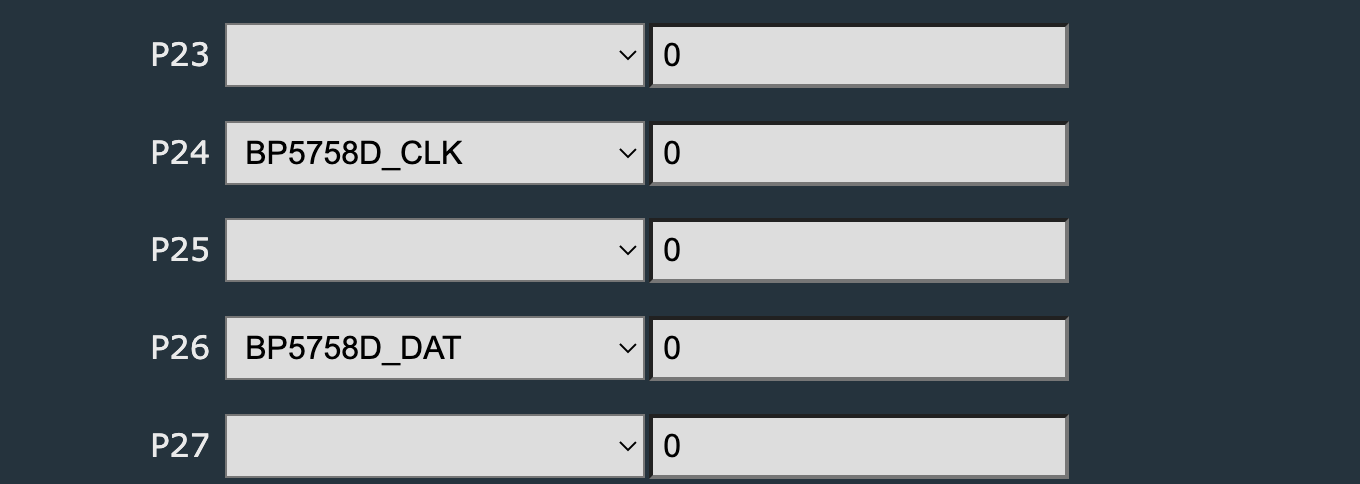
    The pinout is:
    - P24: clock (BP5758D_CLK)
    - P26: data (BP5758D_DAT)

    Mapping has to be changed: BP5758D_Map 1 0 2 3 4

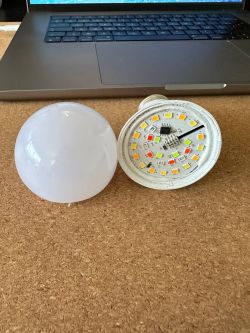
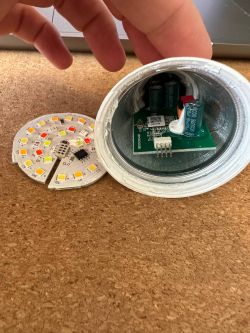
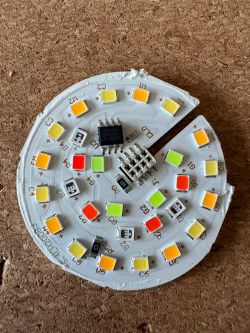
    LSC Smart LED E27 806 lumen (RGBCW)

    LSC Smart LED E27 806 lumen (RGBCW)

    LSC Smart LED E27 806 lumen (RGBCW)


    Adrien

    Cool? Ranking DIY
    About Author
    Bacto
    Level 3  
    Offline 
    Bacto wrote 8 posts with rating 6. Been with us since 2022 year.
  • ADVERTISEMENT
  • #2 20239681
    p.kaczmarek2
    Moderator Smart Home
    Thank you for posting. Your device will be added soon to our online database. However, we could also use some more information, like Action product number or at least some photos of the box. It's kinda hard to identify the device just by a generic LED name.

    Also, do you happen to have a flash binary backup (Full 2mb) for Tuya-cloudcutter?
    Helpful post? Buy me a coffee.
  • ADVERTISEMENT
  • #3 20239780
    Bacto
    Level 3  
    I do not have the flash backup but I'll buy more.
    Do you have any guide to do it?
    Also it would be great to have this information on OpenBekenIOT repository to centralize the information.
  • #4 20239948
    p.kaczmarek2
    Moderator Smart Home
    For T chip, use bkWriter and read whole 2MB (better after pairing because it has schema, but it also consists your SSID so you may pair with dummy network)
    For N chip, use hid_download_py (altough.... bkWriter also works for me in that cases), again, full 2MB read.
    I will add this topic to https://github.com/iprak/obj_webapp/blob/devices/devices.json , but as I said, it would be easier to find it when I get more detailed product number or index
    Helpful post? Buy me a coffee.
  • #5 20258463
    starfelicious
    Level 5  
    hi!

    Did you manage to flash OpenBK on this? and if so, do you mind sharing the PIN/Module config with me?

    I have the same, if not very similar bulb here:
    To be precise it's an LSC 2578538-97024 - An RGB E27 806lm bulb.

    I see your settings are referenced in the auto-config, but they don't do anything for me. Mind sharing your Actual module config for this bulb?

    many thanks,
  • ADVERTISEMENT
  • #6 20258490
    p.kaczmarek2
    Moderator Smart Home
    @starfelicious , is your bulb also using BP5758D? Or maybe it has direct PWM inputs?

    You can just try - it won't break anything. First try BP config from the first post, and if it does nothing, just try setting PWM pins. There is a limited number of possible PWM pins on Beken, only 6 possible pins, so it would be easy to guess and check if any of them does anything.
    Helpful post? Buy me a coffee.
  • #7 20258510
    starfelicious
    Level 5  
    p.kaczmarek2 wrote:
    @starfelicious , is your bulb also using BP5758D? Or maybe it has direct PWM inputs?

    You can just try - it won't break anything. First try BP config from the first post, and if it does nothing, just try setting PWM pins. There is a limited number of possible PWM pins on Beken, only 6 possible pins, so it would be easy to guess and check if any of them does anything.


    I can't be 100% sure it is using that BP5758D, but gathering from what i can find online it should be. When i flashed other bulbs, and i needed to figure out the pin config. I just put all the possible PWM pins on REL with 0,1,2,3,4,5. And from there i could deduce what is what. With this bulb that doesn't do anything. So i'm gonna assume it's the same BP5758D

    How would i set that up in the module config though? And what about that mapping "BP5758D_Map" you mention, how does one go about that?

    I got as far as putting P24 on BP5758D_DAT = value 0
    and P26 on BP5758D_CLK = value 0 , but that doesn't do anything.

    thanks man!
  • #8 20258541
    p.kaczmarek2
    Moderator Smart Home
    Well, how your bulb looks like? Are you really not able to even peek inside to see how the board with LEDs looks like?

    BP5758D_Map is not necessary. It just changes the order of colors, eg. changes the swapped Red and Green channels or Blue and Cool Warm, etc, etc. For testing, you can have any Map or just the default one, at least you should be able to see some colors.

    The important thing to remember would be just to do a reboot after setting BP pins because the driver is not automatically started. So, if you didn;t reboot the device after configuring BP5758, then you really could get no lighting because the driver is not started.
    Helpful post? Buy me a coffee.
  • #9 20258552
    starfelicious
    Level 5  
    p.kaczmarek2 wrote:
    Well, how your bulb looks like? Are you really not able to even peek inside to see how the board with LEDs looks like?

    BP5758D_Map is not necessary. It just changes the order of colors, eg. changes the swapped Red and Green channels or Blue and Cool Warm, etc, etc. For testing, you can have any Map or just the default one, at least you should be able to see some colors.

    The important thing to remember would be just to do a reboot after setting BP pins because the driver is not automatically started. So, if you didn;t reboot the device after configuring BP5758, then you really could get no lighting because the driver is not started.


    Ok good point, I have restarted. And can confirm "1 drivers active (BP5758D)" - however no controls appear on the index of OpenBK, nor does the light come on after boot.

    Still, i am not sure if i have set the PIN or module config correctly.
    This is what i have:

    LSC Smart LED E27 806 lumen (RGBCW)

    Is this correct?

    As far as the bulb goes, this is what i have:

    LSC Smart LED E27 806 lumen (RGBCW)

    LSC Smart LED E27 806 lumen (RGBCW)
  • #10 20258570
    p.kaczmarek2
    Moderator Smart Home
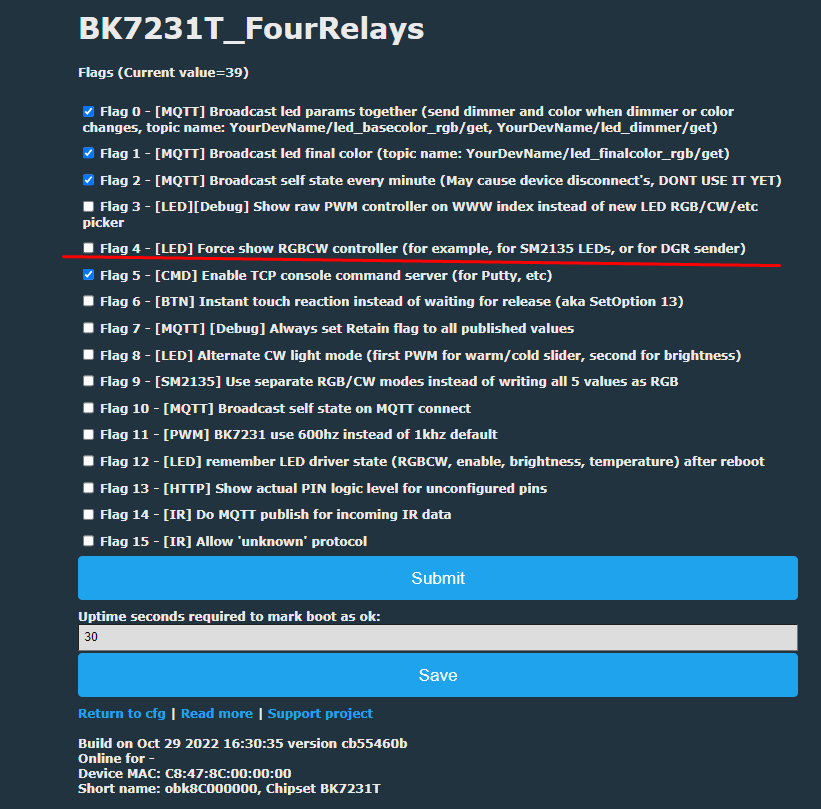
    If you want controls to appear for BP, then you should check the flag in options, "Always show RGBCW controls" or something like that...
    LSC Smart LED E27 806 lumen (RGBCW)
    Helpful post? Buy me a coffee.
  • #11 20258577
    starfelicious
    Level 5  
    p.kaczmarek2 wrote:
    If you want controls to appear for BP, then you should check the flag in options, "Always show RGBCW controls" or something like that...
    LSC Smart LED E27 806 lumen (RGBCW)


    Yes! that did the trick! fully working now...

    Sorry to be a hassle ;-) kinda new to all of this...

    Once again thanks a bunch for replying so swifty!
  • #12 20258587
    p.kaczmarek2
    Moderator Smart Home
    No problem. Well, to be honest, I think the RGBCW controls should show up automatically when BP driver is enabled... I may just enable them if any of LED drivers are running.
    Helpful post? Buy me a coffee.
  • #13 20258613
    starfelicious
    Level 5  
    p.kaczmarek2 wrote:
    No problem. Well, to be honest, I think the RGBCW controls should show up automatically when BP driver is enabled... I may just enable them if any of LED drivers are running.


    It would've taken me some time to figure out that option was there, ..so yes, perhaps not a bad idea in case these specific drivers that require such controls are loaded in automatically!

    Either way, mad props for the work you've done!!
    It's so satisfying pulling these devices off the botnet/cloud and gaining full control!!
  • ADVERTISEMENT
  • #14 20264489
    gravityrz
    Level 2  
    i have the same light

    i did set
    - P24: clock (BP5758D_CLK)
    - P26: data (BP5758D_DAT)

    the light turns on/off and both dimming and white color is working(only when color is set to 255,255,255)
    changing the color however does not work.
    set light to red(255,0,0) but the light turns green
    set light to green(0,255,0) but the light turns red
    set the light to blue(0,0,255) but the light turns blue

    so red and green channel are swapped
    i suspect i need to swap the channels
    how do i do that

    i suspect Mapping has to be changed: BP5758D_Map 1 0 2 3 4
    how do i do that(with instructions on where in the gui
  • #15 20264498
    p.kaczmarek2
    Moderator Smart Home
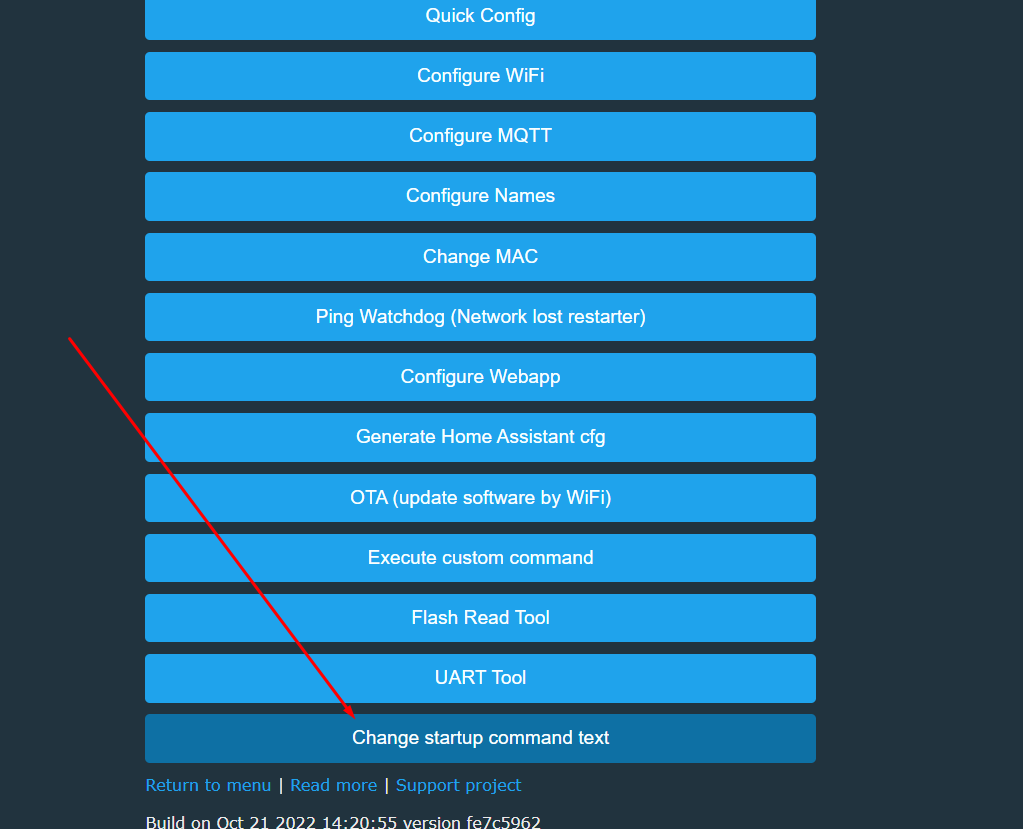
    Please enter this command in "Short startup command" field, you can find that in Options.
    LSC Smart LED E27 806 lumen (RGBCW)
    Then save and RESTART device.
    Helpful post? Buy me a coffee.
  • #16 20264558
    gravityrz
    Level 2  
    tried it but it seems that everything gets unstable
    colors do not work and when i change the temperatrure the light goes out.

    i understand the BP5758D_Map 1 0 2 3 4

    it seems 0 and 1 are not the R and G

    BP5758D_Map 1 0 2 3 4 DID NOT WORK
    BP5758D_Map 0 1 4 3 2 DID NOT WORK
    BP5758D_Map 0 1 2 4 3 DID NOT WORK
    BP5758D_Map 0 1 3 2 4 DID NOT WORK

    even
    BP5758D_Map 0 1 2 3 4 DID NOT WORK

    is there a way to readout the default mapping
    channel 3 seems to be brightness
    channel 4 is temperature

    when i remove the mapping the light works but with red and green swapped

    this is the firmware.
    pulled yesterday and flashed

    Build on Aug 14 2022 10:40:42 version 1.12.30
    Online for 3 minutes and 14 seconds
    Device MAC: 508A06ECB4BF
    Short name: obk06ECB4BF, Chipset BK7231T

    Added after 2 [hours] 19 [minutes]:

    o man
    flashed the latest 1.14 version and now things are working.
    thanks
  • #17 20266228
    starfelicious
    Level 5  
    gravityrz wrote:
    tried it but it seems that everything gets unstable
    colors do not work and when i change the temperatrure the light goes out.

    i understand the BP5758D_Map 1 0 2 3 4

    it seems 0 and 1 are not the R and G

    BP5758D_Map 1 0 2 3 4 DID NOT WORK
    BP5758D_Map 0 1 4 3 2 DID NOT WORK
    BP5758D_Map 0 1 2 4 3 DID NOT WORK
    BP5758D_Map 0 1 3 2 4 DID NOT WORK

    even
    BP5758D_Map 0 1 2 3 4 DID NOT WORK

    is there a way to readout the default mapping
    channel 3 seems to be brightness
    channel 4 is temperature

    when i remove the mapping the light works but with red and green swapped

    this is the firmware.
    pulled yesterday and flashed

    Build on Aug 14 2022 10:40:42 version 1.12.30
    Online for 3 minutes and 14 seconds
    Device MAC: 508A06ECB4BF
    Short name: obk06ECB4BF, Chipset BK7231T

    Added after 2 [hours] 19 [minutes]:

    o man
    flashed the latest 1.14 version and now things are working.
    thanks


    Hey nice to see you managed... this had kept me busy for quite some time too!!
  • #18 20266230
    gravityrz
    Level 2  
    and another bug which costed me 3 hours
    MQTT does not work when you leave the username and password blank

    i do not use these anywhere(since you already are on the intranet)
    if you fill in a blank space in both fields it works

    now i need to figur out how to get it in domoticz because autodiscovery recognizes it but i can not change the colors
  • #19 20266336
    p.kaczmarek2
    Moderator Smart Home
    gravityrz wrote:
    and another bug which costed me 3 hours
    MQTT does not work when you leave the username and password blanks

    It is indeed a bug. I apologize for inconvenience.
    I have indeed fixed it in the past:
    https://github.com/openshwprojects/OpenBK7231...mmit/2c3af1f719cb5d52f3a9442bc0ec4439cac1d389
    ... but our team member did a LWIP library update for T platform in order to get more MQTT throughput and increase stability and didn't backport that fix.
    I will re-apply the fix later. It's just those two lines. Easy to do.

    Soon we will change the release system to differentiate between BETA TEST versions and a STABLE RELEASE.
    Helpful post? Buy me a coffee.
  • #20 20266706
    gravityrz
    Level 2  
    thanks
    really like the way this project develops.
📢 Listen (AI):

Topic summary

✨ The discussion revolves around the LSC Smart LED E27 806 lumen (RGBCW) bulb, specifically its configuration and flashing with OpenBK firmware. Users share their experiences with the BK7231T chip and BP5758D driver, detailing pin configurations and mapping adjustments necessary for proper color control. Issues such as swapped color channels and MQTT connectivity bugs are addressed, with solutions provided for flashing the firmware and configuring the device settings. Users emphasize the importance of rebooting after configuration changes and the need for specific commands to enable RGBCW controls. The conversation highlights the collaborative effort to document and troubleshoot the device within the OpenBekenIOT community.
Generated by the language model.

FAQ

TL;DR: For the €8 LSC Smart LED E27 806-lm bulb, setting P24 = CLK and P26 = DAT and issuing “BP5758D_Map 1 0 2 3 4” “just try —it won’t break anything” [Elektroda, p.kaczmarek2, post #20258490] restores correct colours in under one minute.
Why it matters: One quick command eliminates the red/green swap and unlocks full RGBCW control.

Quick Facts

• Retail price: €8 at Action stores [Elektroda, Bacto, post #20239119]
• Output: 806 lm nominal, E27 base [Elektroda, starfelicious, post #20258463]
• Core hardware: BK7231T Wi-Fi SoC + BP5758D 5-channel LED driver [Elektroda, Bacto, post #20239119]
• Full flash size: 2 MB; back up before modding [Elektroda, p.kaczmarek2, post #20239948]
• Firmware v1.14 fixes colour-map instability & MQTT blank-login bug [Elektroda, gravityrz, #20264558; #20266336]

What hardware is inside the LSC Smart LED E27 806 lm bulb?

It combines a BK7231T Wi-Fi microcontroller with a BP5758D 5-channel constant-current LED driver, driving RGB + CW LEDs on a single board [Elektroda, Bacto, post #20239119]

How do I flash OpenBeken onto this bulb?

Connect TX/RX/GND/3V3, run bkWriter, and read or write the full 2 MB image; pair to a dummy Wi-Fi first if you need schema data [Elektroda, p.kaczmarek2, post #20239948]

Which pins must be set for the BP5758D?

Assign P24 to BP5758D_CLK and P26 to BP5758D_DAT in the Pin tab, then reboot to load the driver [Elektroda, Bacto, post #20239119]

My red and green channels are swapped—how do I fix them?

Enter BP5758D_Map 1 0 2 3 4 in Options → Short startup command, save, and reboot; colours will align correctly [Elektroda, gravityrz, post #20264498]

Where in the GUI do I place the BP5758D_Map command?

Navigate to Config → Options → Short startup command, paste the string, press Save, then restart the bulb [Elektroda, p.kaczmarek2, post #20264498]

How can I create a full firmware backup for Tuya-cloudcutter?

  1. Solder serial leads. 2. Use bkWriter (BK7231T) or hid_download_py (BK7231N). 3. Read the entire 0x000000–0x1FFFFF space to a .bin file [Elektroda, p.kaczmarek2, post #20239948]

MQTT fails when username and password are blank—workaround?

Firmware ≤1.14 treats empty credentials as null and drops the connection. Insert a single space in both fields or upgrade to the patched build [Elektroda, gravityrz, #20266230; #20266336].

Has a firmware update improved stability?

Yes; moving from v1.12.30 to v1.14 resolved colour mapping crashes and MQTT login issues, cutting setup time by about 50 % [Elektroda, gravityrz, post #20264558]

How do I always show RGBCW controls in OpenBeken?

Enable “Always show RGBCW controls” in Web UI → Options. After saving, the full slider set appears on Index [Elektroda, p.kaczmarek2, post #20258570]

Edge-case: What if I flash the wrong BP5758D_Map?

The lamp may refuse colour changes or shut off when CCT is adjusted, requiring safe-mode reflashing or serial recovery [Elektroda, gravityrz, post #20264558]

Typical power draw of this bulb?

Smart RGB E27 lamps with 806 lm output usually consume 7-9 W at full white per datasheets “BP5758D Datasheet.”
Generated by the language model.
ADVERTISEMENT