logo elektroda
logo elektroda
X
logo elektroda
Dostępna jest polska wersja

Czy wolisz polską wersję strony elektroda?

Nie, dziękuję Przekieruj mnie tam

Beken Flash Dump Partition Info Extraction with RT-Threads Partition Tool - Development Thoughts?

divadiow 1335 49
Best answers

How can I extract partition offsets and lengths from Beken flash dumps by locating the RT-Threads partition table, and is this worth integrating into OBK or Easy Flasher?

You can turn this into a combined workflow that strips Beken CRC bytes, scans the dump for the FAL partition table magic `0x45503130` (`"01PE"`), and then extracts offsets and lengths, but it should validate CRCs and not rely on the current blind `uncrc` script alone [#21735648][#21737854][#21752598] The RT-Threads/Beken table is the `fal_partition` struct from `fal_def.h`, with fields for partition name, flash name, offset, length, and reserved data, so once found the CLI can print usable partition info [#21752598] This looks like a reasonable feature to add to Easy Flasher or OBK, but the thread recommends getting a correct CRC16 path in place first because not all data is CRCed and the existing script does not actually check CRCs [#21737851][#21737854][#21737860] The approach did work on some BK-T and BK-N dumps after fixes, so it is useful for backups and standard layouts [#21737153][#21737515] However, it is not a guaranteed way to infer a safe OTA target on every device; one example said a Uascent bootloader OTA address of `0x147000` would overwrite LFS/RF/config, so dynamic partition scanning may still be needed [#21737549][#21737552] TLV detection was also suggested as an extra check, especially for locating MAC and RF data for restoration [#21738157]
ADVERTISEMENT
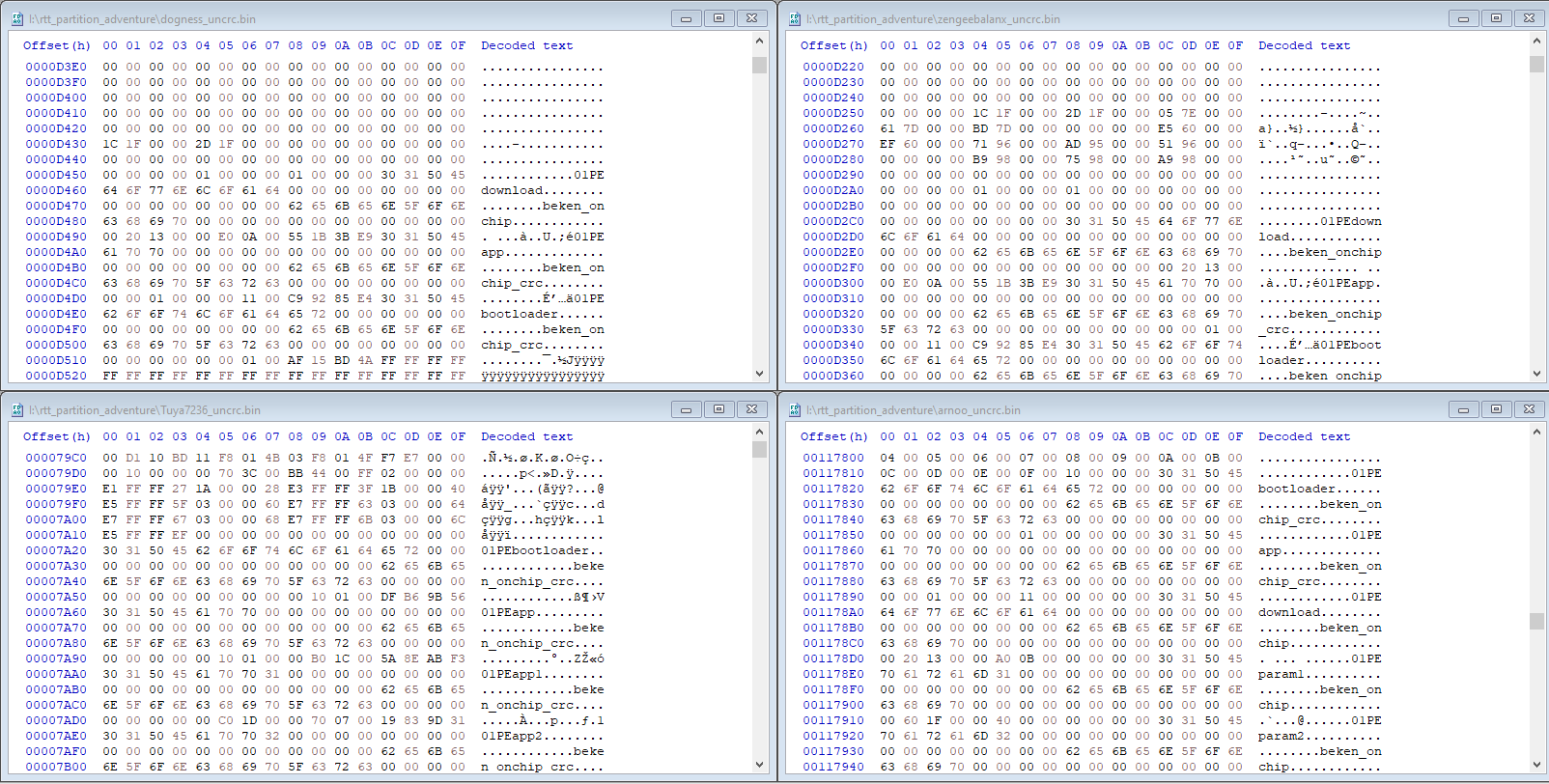
  • Helpful post
    #1 21734412
    divadiow
    Level 38  
    It's oftentimes useful to know what the partition offsets and lengths are on any given device that may be up for conversion to OpenBK*. This can be useful when determining if a device should have its bootloader overwritten by using the QIO release in order, for example, to allow OTA updates to work. OpenBK will write the ota file to a fixed offset and if the bootloader isn't looking for updates to initiate from the same location, then OTA will fail.

    From the backup of the factory firmware it can usually be worked out from the boot log or by analysing the partition table starting "01PE" what the offsets are, but this requires a bit of sleuthing and getting your head around reverse-byte order little-endian in order to read what's been configured.
    eg https://www.elektroda.com/rtvforum/topic4074263.html#21217939

    I've been fiddling with the RT-Threads Partition Tool, which lets you edit/add partitions to a virgin bootloader.
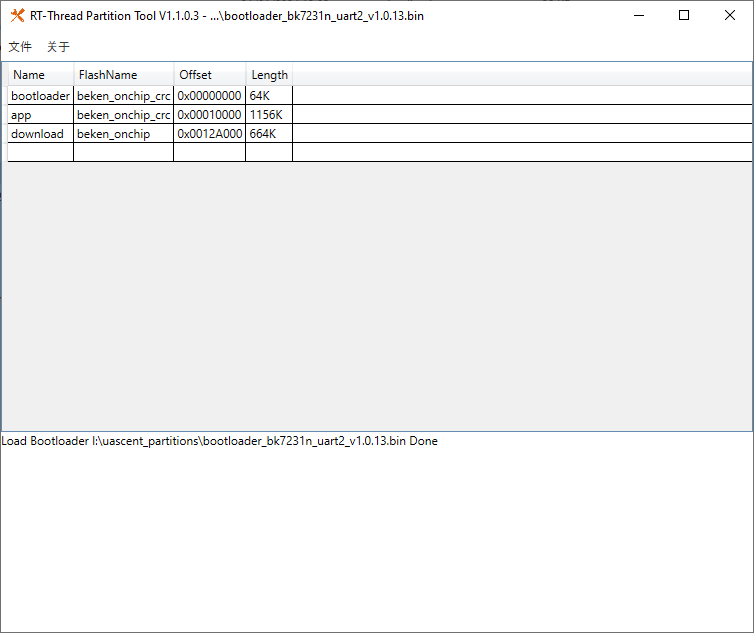
    eg, open bootloader_bk7231n_uart2_v1.0.13.bin that can be found in the Beken SDK and the tool will show you what's set
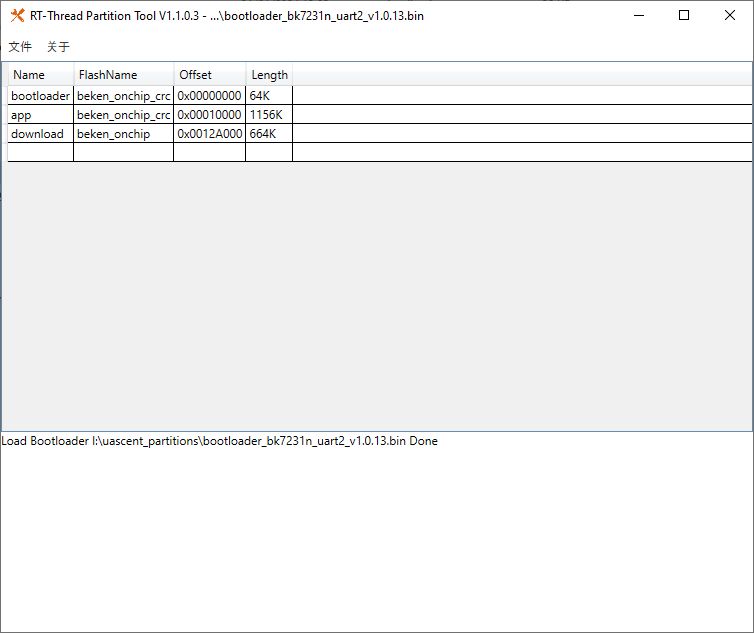
    Partition table from bootloader file in RT-Thread Partition Tool window

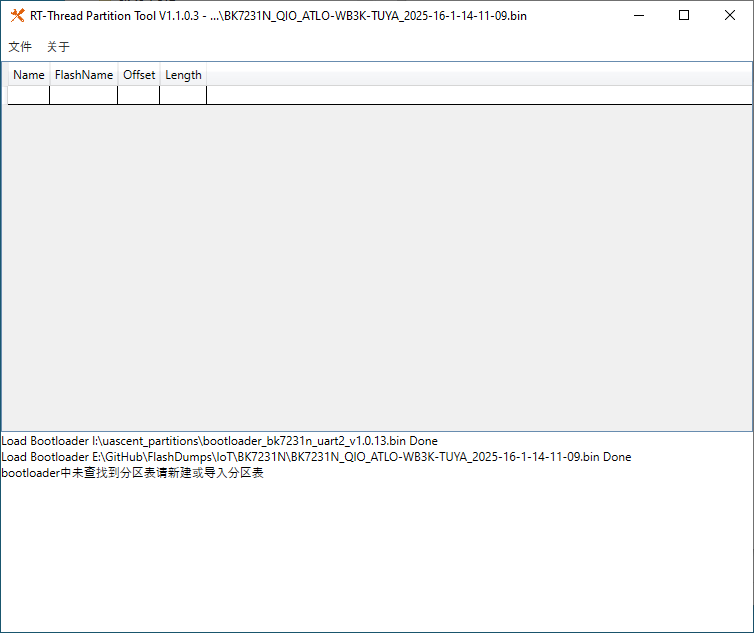
    That's great, but it doesn't work on a standard 2mb dump.

    BK7231N_QIO_ATLO-WB3K-TUYA_2025-16-1-14-11-09.bin
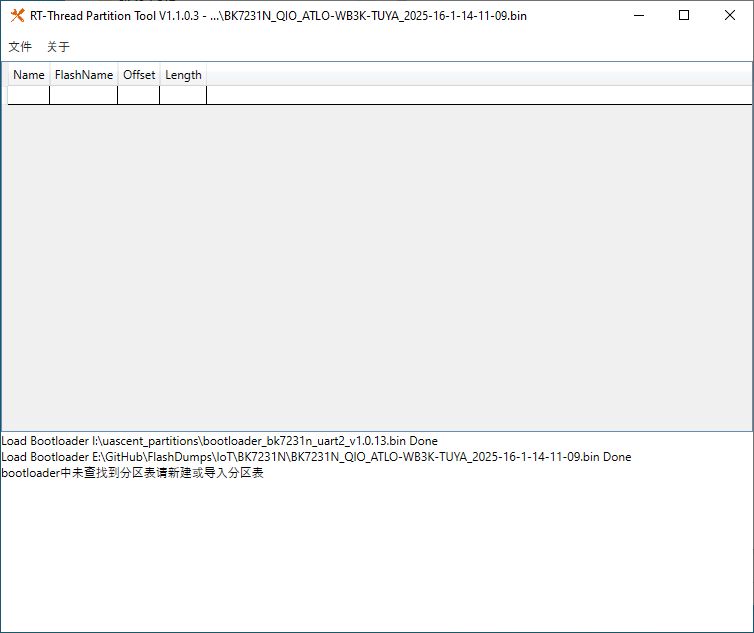
    RT-Thread Partition Tool window with bootloader and firmware files loaded

    With this in mind:
    insmod wrote:
    Yes, and it's that way on every beken, whether encrypted or not.
    Every 32 bytes of data is followed by 2 bytes of crc

    You can create a script that would remove those bytes to get readable strings, if required.


    and using @Paver3109's uncrc script from https://github.com/fusetim/insecurity-camera-tools/tree/main/firmware the crc can be removed

    Code: Text
    Log in, to see the code


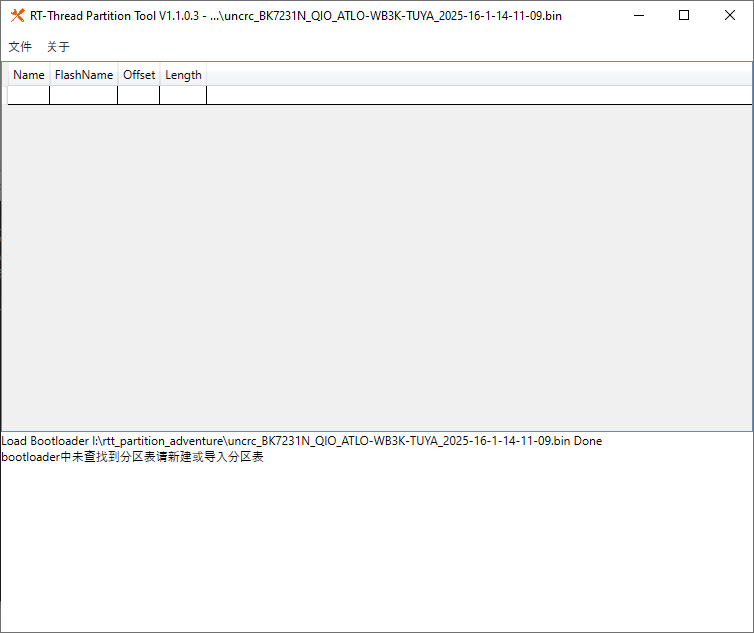
    but the resultant file is still not readable in the GUI tool nor CLI
    RT-Thread Partition Tool window showing no partition table read from BIN file

    Code: Text
    Log in, to see the code


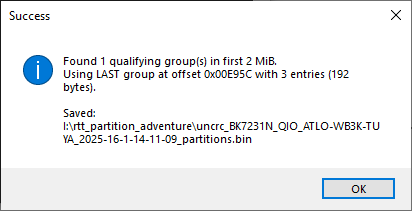
    This script will scan the first 2mb and extract the section of 2 more where "01PE" is seen 64 bytes apart
    Code: Python
    Log in, to see the code


    It launches a Windows picker for the input file and will give a result summary and output a file suffixed with _partitions to filename
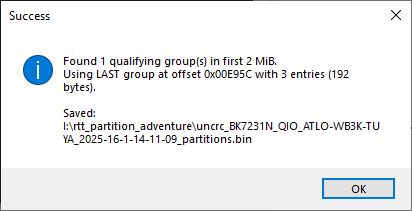
    Success dialog showing 01PE group found and partition file saved

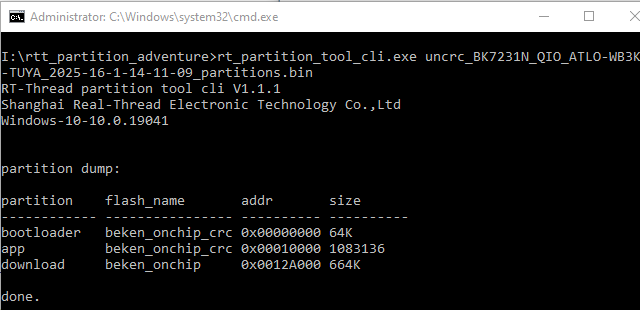
    While the result still does not reveal anything if opened with the GUI tool, it will work with the CLI
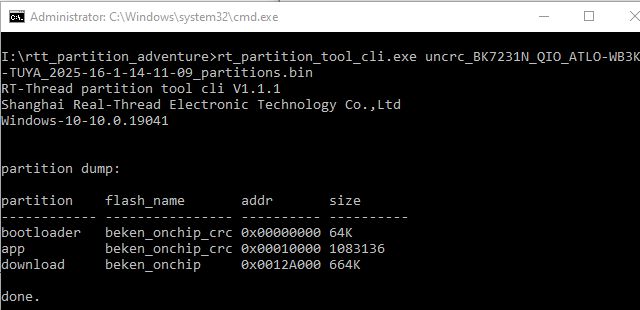
    Screenshot of rt_partition_tool_cli.exe showing flash partition data in console

    Let's test with some Bekens of various flavours, 2mb and 4mb.

    4MB BK72326 - Tuya_T3-3S_readResult_BK7231N_QIO_7236_fixed-insmod.bin
    Code: Text
    Log in, to see the code


    needs de-deduping

    non-Tuya 4MB Matter BK7231M - SparkleIoT_XH-CB2S_Mini_Switch.bin
    Code: Text
    Log in, to see the code


    Non-Tuya BK7231U - Arnoo_Winees_WS010078261_AiDot_RGBW_A60_(2ndGen)_(light.A001139)_Leedarson_CC8000_2.0.4.51.bin
    Code: Text
    Log in, to see the code


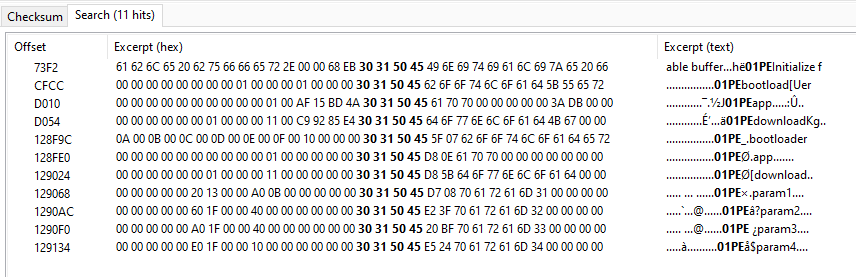
    This one was interesting, and why the search for 01PE was set to cover 2mb, There's the 3 01PEs at the beginning of the flash and then another set further in
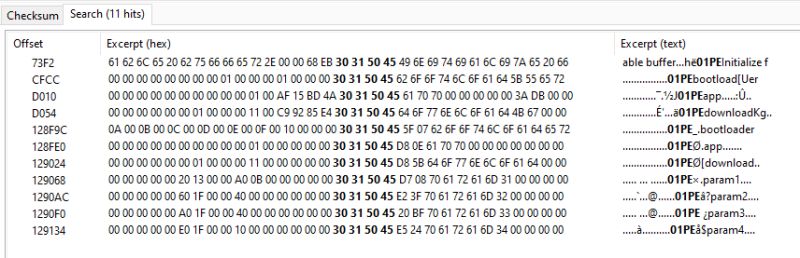
    Hex view displaying occurrences of the 01PE string in a flash dump file

    Interesting, but probably not a reason to scan beyond initial 01PE area.

    BK7231T_Denver-SHP-200MK2.bin
    Code: Text
    Log in, to see the code


    non-Tuya BK7238 - Zengge_AK001-ZJ21413_77_24_20240423_ZG-BK_Symphony_USB_SPI_LED.bin
    Code: Text
    Log in, to see the code


    Tuya BK7238 1 - Tuya_Switch_(schemaID-e1mzkfec)_keyfxuj3d5wg53wx_jsejjp8bin9lllh3_T1-2S-NL_1.1.4.bin
    Fail - no 01PE in dump

    Tuya BK7238 2 - Tuya_IHSENO_HAZ-IR-V3_(schemaID-e1mybg3w)_keycmhjv873dhvsn_kv4htgxocgwjfabc_T1-3S_0.0.5.bin
    Fail - no 01PE in dump

    non-Tuya BK7252N - Pinmei_A9_BK7252N_BKFIL.bin
    Code: Text
    Log in, to see the code


    4MB Tuya BK7252U - Tuya_Doorbell_IP06-V6.3-BekenSPI_2025-08-10-21-29-16.bin
    Fail - no 01PE in dump

    4MB Tuya BK7252U - Tuya_A9_Cam_SC-10024_V1.0.0_(VGA卡片机-schemaID-000003uanz)_keyph8vwhadwsx3a_u0kmecmr7j8roazz_NEO_SPI_1.0.4.bin
    Code: Text
    Log in, to see the code


    and so on. If the dump has 01PE partition style then it seems we can easily read it.

    So, what next?

    -extract Python script from RT tool GUI and CLI EXEs?
    -consolidate different steps into one script
    -make a C application and integrate with Easy Flasher- new tab?
    -add additional checks - eg TLV start location?

    thoughts?

    I attach the scripts used above, and some extras, including extraction of all groups of 01PE if found. RT Partition Tool too.

    Flashdumps tested with can be found at https://github.com/openshwprojects/FlashDumps/tree/main/IoT
    Attachments:
    • rt_partition_tool.zip (15.72 MB) You must be logged in to download this attachment.
    • beken_partition_extraction_scripts.zip (10.94 KB) You must be logged in to download this attachment.
  • ADVERTISEMENT
  • #2 21734694
    p.kaczmarek2
    Moderator Smart Home
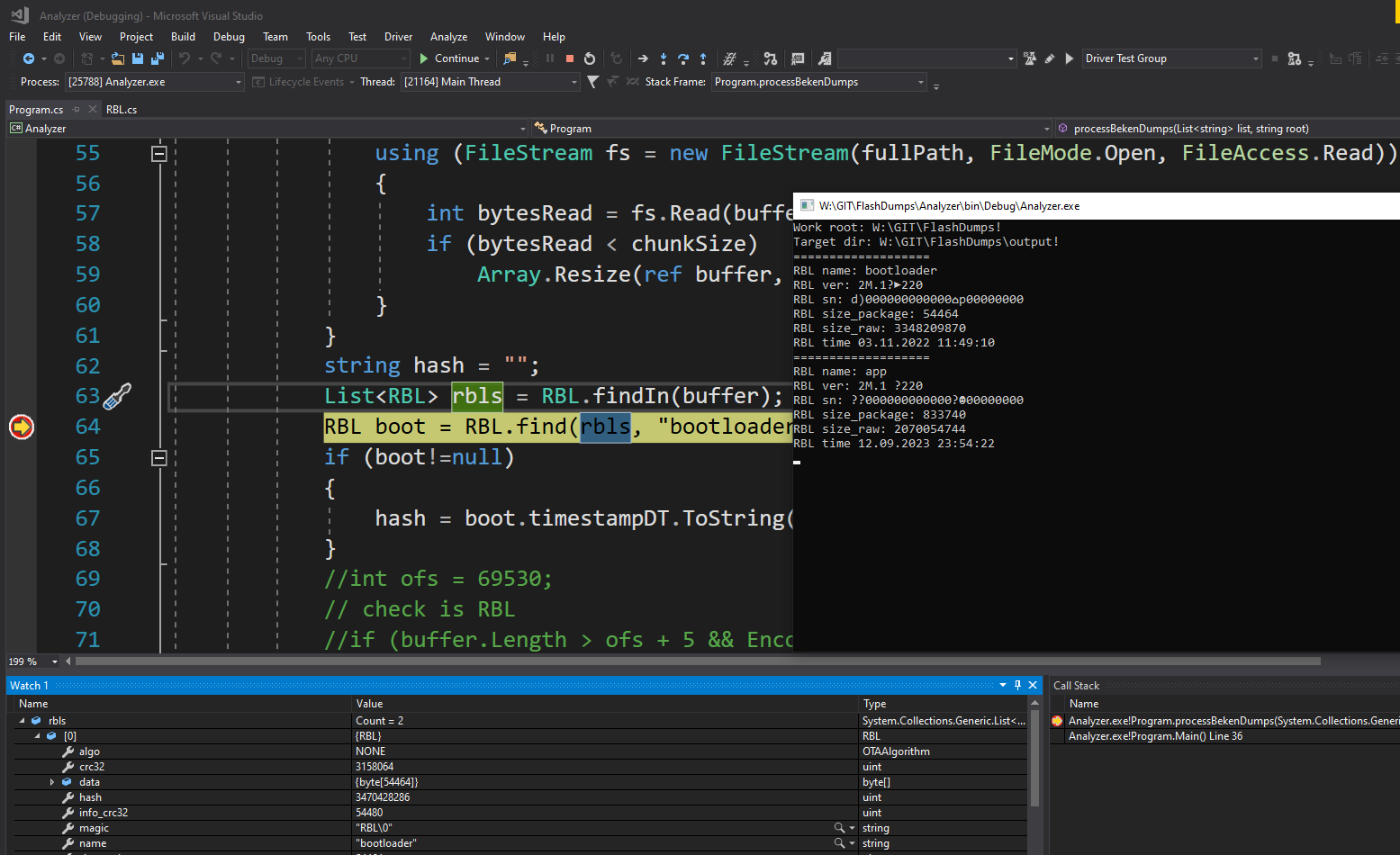
    Interesting, is it the same as the RBL extraction that I started some time ago in FlashDumps?
    Visual Studio in debug mode with C# code and console window displaying RBL data
    https://github.com/openshwprojects/FlashDumps
    https://openshwprojects.github.io/FlashDumps/
    Or wait, it seems it's not the same... RBL just finds RBL identifiers in the binary, not 01PE
    Helpful post? Buy me a coffee.
  • ADVERTISEMENT
  • #3 21734706
    divadiow
    Level 38  
    still, interesting. what were you hoping to achieve or was it just to see what was readable from rbls?
  • #4 21734718
    p.kaczmarek2
    Moderator Smart Home
    I was trying to find how many bootloader versions we know, but it didn't work too well for me. Maybe it needs more work. I think your partition table is also very good and useful to implement
    Helpful post? Buy me a coffee.
  • #5 21735502
    divadiow
    Level 38  
    combined.

    Code: Text
    Log in, to see the code

    eg
    Code: Text
    Log in, to see the code
    Attachments:
    • combined_uncrc_extract.zip (5.23 MB) You must be logged in to download this attachment.
  • #6 21735619
    p.kaczmarek2
    Moderator Smart Home
    Why it needs to call rt_partition_tool_cli.exe? I think I am confused.

    divadiow wrote:
    OpenBK will write the ota file to a fixed offset and if the bootloader isn't looking for updates to initiate from the same location, then OTA will fail.

    Maybe we could do that in OBK itself?
    Helpful post? Buy me a coffee.
  • #7 21735633
    divadiow
    Level 38  
    p.kaczmarek2 wrote:
    Why it needs to call rt_partition_tool_cli.exe? I think I am confused.


    that's the tool that does the final read of partitions. I haven't opened up exe to see how it's scripted. or even tried to script without looking. it'd be with GPT help either way.

    p.kaczmarek2 wrote:
    Maybe we could do that in OBK itself?


    by having OBK read download partition offset from table?
  • #8 21735643
    p.kaczmarek2
    Moderator Smart Home
    I am not yet sure how it works internally. I've been thinking about doing flash scan for 01PE entries in OBK itself, but I would need to skip CRCs, right?
    Code: C / C++
    Log in, to see the code
    Helpful post? Buy me a coffee.
  • #9 21735648
    divadiow
    Level 38  
    p.kaczmarek2 wrote:
    but I would need to skip CRCs, right?

    yes. the py in that zip is the combination of the two parts in post 1. uncrc then 2. partition table extraction

    Added after 1 [minutes]:

    I'll open up the cli.exe now to look at the insides
  • Helpful post
    #10 21735668
    p.kaczmarek2
    Moderator Smart Home
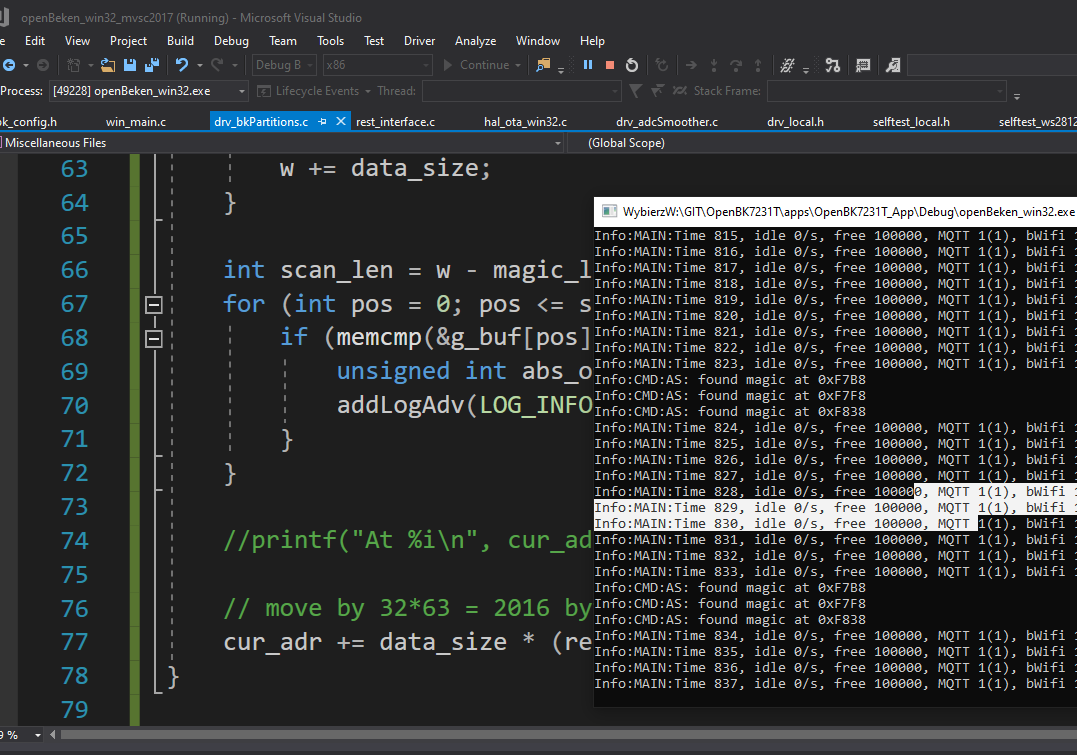
    I am testing in the simulator with beken binary dump
    Visual Studio environment with C code and OpenBeken simulation logs shown
    Helpful post? Buy me a coffee.
  • #11 21735699
    divadiow
    Level 38  
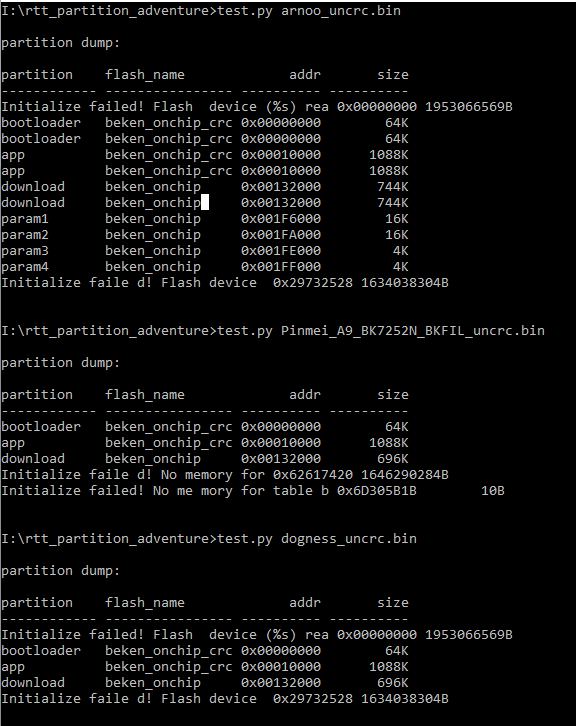
    interesting kinda

    py on uncrcd full dumps. tables plus some junk

    Console screenshot showing test.py results for various .bin files and flash errors

    Code: Python
    Log in, to see the code
  • ADVERTISEMENT
  • #12 21735710
    p.kaczmarek2
    Moderator Smart Home
    To be sure - we are searching for 01PE because it's not at the constant offset?
    Helpful post? Buy me a coffee.
  • #13 21735714
    divadiow
    Level 38  
    my experience has been that it differs

    eg

    Screenshot of hex editor with four BIN files opened showing binary and decoded text
  • #14 21735727
    p.kaczmarek2
    Moderator Smart Home
    I see.
    You can try running this now:
    https://github.com/openshwprojects/OpenBK7231T_App/pull/1847
    
    startDriver BKPartitions
    

    should print offsets...

    Added after 17 [seconds]:

    wait a sec, i didn't enable it on beken i think
    Helpful post? Buy me a coffee.
  • Helpful post
    #15 21735784
    divadiow
    Level 38  
    N
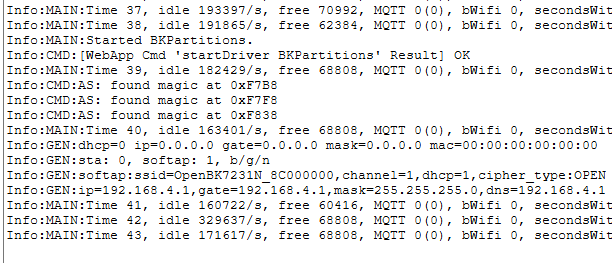
    System logs of an IoT device booting, showing Wi-Fi network and MQTT status

    T gave no result
  • #16 21735804
    p.kaczmarek2
    Moderator Smart Home
    But T also has it, right? Maybe I can't read 0x0-0x11000 section on T and I need to apply 0x20000 offset...
    Helpful post? Buy me a coffee.
  • #17 21735807
    divadiow
    Level 38  
    p.kaczmarek2 wrote:
    But T also has it, right?


    all I have tried with script have. Dump of same T tested with run through script =

    Code: Text
    Log in, to see the code
  • #18 21735956
    p.kaczmarek2
    Moderator Smart Home
    I've pushed a little change. I added 0x200000 offset. I'm curious whether it will work - it's the same trick which is used by flasher.
    Helpful post? Buy me a coffee.
  • #19 21736095
    divadiow
    Level 38  
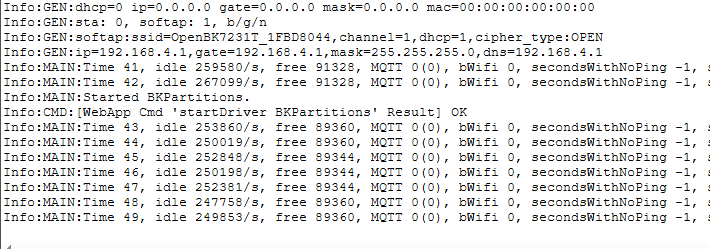
    negative. 1847_merge_c03a1c868c29
    Screenshot of a system log with network and MQTT connectivity status

    Added after 11 [hours] 12 [minutes]:

    divadiow wrote:
    Non-Tuya BK7231U - Arnoo_Winees_WS010078261_AiDot_RGBW_A60_(2ndGen)_(light.A001139)_Leedarson_CC8000_2.0.4.51.bin


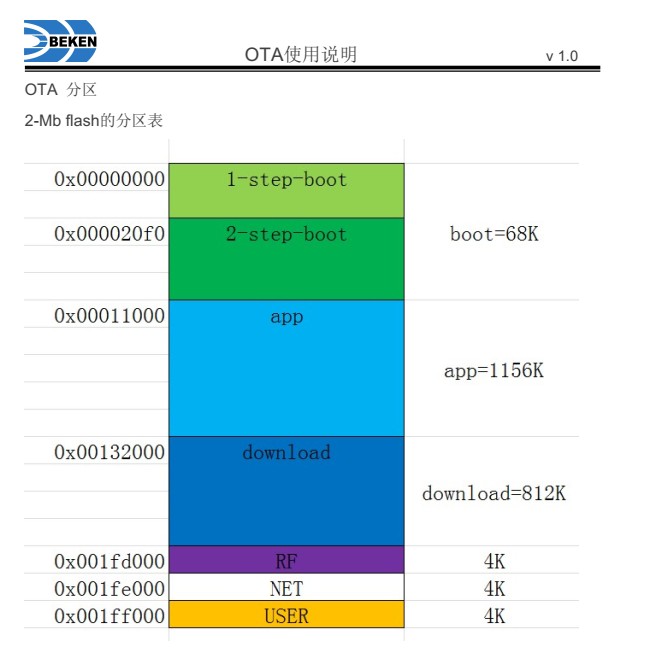
    interesting.
    Memory map of 2 Mb flash divided into boot, app, download, RF, NET, and USER sections
    Attachments:
    • BK7231U_升级说明.pdf (1.17 MB) You must be logged in to download this attachment.
  • #20 21737153
    p.kaczmarek2
    Moderator Smart Home
    Does it look valid?
    
    Info:CMD:AS: found magic at 0xF7A2
    Info:CMD:AS: nearest at 0xF790
    Info:CMD:Partition found at 0xF7EC: bootloader flash=beken_onchip_crc offset=0x0 size=65536 extra=0 layout=fal64
    Info:CMD:Partition found at 0xF82C: app flash=beken_onchip_crc offset=0x10000 size=1083136 extra=0 layout=fal64
    Info:CMD:Partition found at 0xF86C: download flash=beken_onchip offset=0x12A000 size=679936 extra=0 layout=fal64
    

    I pushed a fix, still probably N only.

    Added after 1 [hours]:

    added sanity check (partition length) useful for some binaries:
    
    Info:MAIN:Started BKPartitions.
    Info:CMD:AS: found magic at 0x88F0
    Info:CMD:AS: nearest at 0x88EE
    Info:CMD:Abnormal partition length, probably invalid, skipping
    Info:CMD:Abnormal partition length, probably invalid, skipping
    Info:CMD:AS: found magic at 0xE0CC
    Info:CMD:AS: nearest at 0xE0B8
    Info:CMD:Partition found at 0xE138: bootloader flash=beken_onchip_crc offset=0x0 size=65536 extra=1253905839 layout=fal64
    Info:CMD:Partition found at 0xE178: app flash=beken_onchip_crc offset=0x10000 size=1063936 extra=3505373052 layout=fal64
    Info:CMD:Partition found at 0xE1B8: download flash=beken_onchip offset=0x125000 size=737280 extra=241988858 layout=fal64
    Helpful post? Buy me a coffee.
  • #21 21737515
    divadiow
    Level 38  
    1847_merge_c8e0bc728e21

    BK-T
    Code: Text
    Log in, to see the code


    BK-N
    Code: Text
    Log in, to see the code
  • #22 21737516
    p.kaczmarek2
    Moderator Smart Home
    Wait, what? It suddenly started working for T? Well, there indeed was a bug...

    Why is the partition twice in T?
    Helpful post? Buy me a coffee.
  • #23 21737523
    divadiow
    Level 38  
    p.kaczmarek2 wrote:
    Wait, what? It suddenly started working for T?

    seems so. I wonder which build fixed it, I could check :/

    p.kaczmarek2 wrote:
    Why is the partition twice in T?

    hmm. yes.

    only 3 01PE
    Hex memory dump showing 01PEbootloader, 01PEapp, and 01PEdownload labels
  • #24 21737538
    p.kaczmarek2
    Moderator Smart Home
    So it works, more or less. Does it mean that we can use this approach to locate OTA target offset? Would that help on some non-standard devices? @insmod
    Helpful post? Buy me a coffee.
  • #25 21737549
    insmod
    Level 31  
    >>21737538
    Doubtful.
    If i remember it correctly, uascent bootloader OTA address is 0x147000.
    It will overwrite LFS, and perhaps RF partition and config?

    Added after 3 [minutes]:

    Let me try to make 1.0.1 uascent bootloader...
  • #26 21737552
    p.kaczmarek2
    Moderator Smart Home
    What if we scan partitions on the first OBK boot and dynamically find good offset for LFS? But probably it's not worth it, idk...
    Helpful post? Buy me a coffee.
  • ADVERTISEMENT
  • #27 21737555
    divadiow
    Level 38  
    insmod wrote:
    Let me try to make 1.0.1 uascent bootloader...


    well, yes. Ultimately a replacement Uascent BL would be best. But has proven problematic so far (for me)

    combined_uncrc_extract_run.py Uascent_uHome_Matter_4CH_White_Switch_CSA23257MAT40770-24_UAM027-A0-V1.0_CBU_3.6.bin
    Code: Text
    Log in, to see the code


    Added after 1 [minutes]:

    replacement BL for any non-OBK standard layout*
  • #28 21737565
    insmod
    Level 31  
    First attempt, not crc'ed
    Attachments:
    • bk7231n_bootloader_enc.bin (58.53 KB) You must be logged in to download this attachment.
  • #29 21737573
    divadiow
    Level 38  
    no boot. no log. I've never seen the standard encrypt v0.3.1 make a working BL. have had to use cmake_encrypt_crc.exe
  • #30 21737577
    insmod
    Level 31  
    >>21737573
    It doesn't boot because it has to be crc'ed first.
    beken_packager does it automatically.
    same binary crc'ed with old encrypt and 0 0 0 0 flags.
    Attachments:
    • bk7231n_bootloader_enc_crc.bin (62.19 KB) You must be logged in to download this attachment.

Topic summary

✨ The discussion focuses on extracting Beken flash dump partition information using the RT-Threads Partition Tool to facilitate OpenBK* firmware conversions and enable OTA updates. The main challenge is identifying partition offsets and lengths, particularly the "01PE" partition table signature, which varies in location and requires handling little-endian reverse byte order and CRC16 checksums embedded every 34 bytes. A combined Python script (combined_uncrc_extract_run.py) was developed to remove CRC16 checksums and extract partition tables from firmware dumps, followed by using the RT-Thread partition tool CLI to parse and display partition layouts. The tool supports different partition table formats (fal64 and fal48) and outputs partition names, flash types, addresses, and sizes. Attempts to integrate partition detection directly into OpenBK firmware were discussed, including scanning flash memory for "01PE" signatures and skipping CRCs. The conversation also covers challenges with bootloader compatibility, encryption, and CRC validation, especially for Uascent and Tuya bootloaders on BK7231N and BK7231T chips. Testing showed that OTA functionality depends on correct partition offsets and bootloader keys, with some success in creating replacement bootloaders that support OTA on non-standard layouts. The importance of TLV detection for MAC and RF data restoration was noted. Suggestions include adding partition detection to flashing tools like Easy Flasher and improving CRC16 verification in scripts. Overall, the approach aids in troubleshooting OTA failures by accurately identifying partition layouts and offsets in Beken-based devices.

FAQ

TL;DR: Beken dumps pack a CRC16 every 34 bytes; “Every 32 bytes of data is followed by 2 bytes of crc.” Extract the 01PE table (64‑byte entries) from the first 2 MiB, then parse it to get exact bootloader/app/OTA offsets for OpenBeken. [Elektroda, divadiow, post #21734412]

Why it matters: This lets you decide if you must flash a QIO bootloader or adjust OTA to avoid bricking.

Who this is for: OpenBeken/Tuya/Beken tinkerers who need reliable partition offsets from raw flash dumps so OTA and backups work consistently.

Quick Facts

How do I extract Beken partition info from a full flash dump?

Run a combined workflow: 1) strip the interleaved CRC (32+2 bytes), 2) scan the first 2 MiB for 01PE entries and extract the last valid group, 3) feed that file to rt_partition_tool_cli to print the table. The provided combined_uncrc_extract_run.py automates all three steps. [Elektroda, divadiow, post #21735502]

Why does the RT‑Thread GUI show nothing on a 2 MiB dump, but the CLI works?

The GUI expects a clean partition blob, while full dumps include CRC16 bytes every 34 bytes and other data. After removing CRCs and isolating the 01PE group, the CLI parses and prints partitions correctly. “It will work with the CLI.” [Elektroda, divadiow, post #21734412]

What is the “01PE” table and why are entries 64 bytes apart?

01PE is the FAL (Flash Abstraction Layer) magic used by Beken/RT‑Thread bootloaders to list partitions. Each entry is 64 bytes. Searching the first 2 MiB for contiguous 01PE entries (i, i+64, …) yields the active table that tools can decode. [Elektroda, divadiow, post #21734412]

Can OpenBeken detect partitions on the device without a PC?

Yes. The BKPartitions driver scans flash for 01PE, applies sanity checks, and logs partition name, flash type, offset, and size at boot or on command. Example logs show bootloader at 0x0, app at 0x10000, and download near 0x12A000–0x132000. [Elektroda, p.kaczmarek2, post #21737153]

Will this approach work on all Tuya/Beken variants?

No. Some Tuya BK7238 and 4 MB BK7252U dumps contain no 01PE; the scan returns nothing. In those cases, you need a different strategy (e.g., vendor bootloader knowledge or alternate tooling). That’s an expected edge case. [Elektroda, divadiow, post #21734412]

What offsets are typical on BK7231N/T devices?

Logs show common layouts: bootloader 0x00000000 (64K), app 0x00010000 (~1,083,136 bytes), and download around 0x0012A000 or 0x00132000 (≈664–680K). Values vary by build, so always read the actual table before OTA. [Elektroda, p.kaczmarek2, post #21737515]

How do I handle duplicate or multiple 01PE groups?

De‑duplicate entries and prefer the last valid group in the first 2 MiB window. 4 MB dumps can show repeated entries; sorting and deduping by address/name normalizes the output before use. [Elektroda, divadiow, post #21734412]

Could OTA fail even if I flashed the app?

Yes. OpenBeken writes OTA to a fixed offset; if the bootloader checks another offset, OTA will fail. Read the partition table first or flash a bootloader aligned with OBK’s OTA expectations (e.g., QIO release). [Elektroda, divadiow, post #21734412]

What CRC16 parameters are used when validating 34‑byte records?

Use CRC16 with polynomial 0x8005 and initial value 0xFFFF over each 32‑byte data block; the following 2 bytes store the CRC (little‑endian). Validating avoids blindly stripping bytes from unrelated data. [Elektroda, p.kaczmarek2, post #21737854]

Why does CRC checking stop working part‑way through my dump?

Not all regions use the 32+2 CRC scheme. During checks, validation can start failing (example: at offset 57,528), so switch to raw parsing or limit the CRC‑aware window to the confirmed region. [Elektroda, p.kaczmarek2, post #21737860]

Can OBK use partition scanning to pick a safe LFS/OTA offset automatically?

Yes, that’s the idea behind the BKPartitions work. OBK can scan 01PE, validate lengths, and pick offsets to reduce user error on non‑standard layouts. It’s already printing partitions from live devices. [Elektroda, p.kaczmarek2, post #21737153]

What’s special about the Uascent bootloader OTA address?

“If I remember it correctly, Uascent bootloader OTA address is 0x147000.” Using that address risks overwriting LFS and RF/config partitions unless the layout matches. Adjust tools or replace the bootloader. [Elektroda, insmod, post #21737549]

How do I quickly run the extraction on Windows? (3‑step How‑To)

  1. Run combined_uncrc_extract_run.py to remove CRC and extract the last 01PE group. 2. The script emits _partitions.bin. 3. It launches rt_partition_tool_cli.exe to print partition name/offset/size. [Elektroda, divadiow, post #21735502]

Why search for 01PE instead of reading a constant offset?

Because the table’s location varies across devices and builds. Screenshots show different 01PE offsets even for similar chips, so fixed addresses are unreliable. Searching ensures you use the active table. [Elektroda, divadiow, post #21735714]

Where can I find sample dumps to test my parser?

A public repository of IoT flash dumps is linked from the thread. Use these to validate your extraction and dedup logic across chip variants and sizes. [Elektroda, divadiow, post #21734412]

Is TLV (MAC/RF) detection useful with partition scanning?

Yes. After parsing partitions, TLV detection helps locate MAC, RF, and calibration data so you can preserve and restore them where OpenBeken expects. This is valuable during cross‑SDK migrations. [Elektroda, divadiow, post #21738157]
ADVERTISEMENT