logo elektroda
logo elektroda
X
logo elektroda
Dostępna jest polska wersja

Czy wolisz polską wersję strony elektroda?

Nie, dziękuję Przekieruj mnie tam

[OpenBeken] Setting NTP Server Based on Network Conditions

Beken_Call 2535 13
ADVERTISEMENT
  • #1 21086155
    Beken_Call
    Level 3  

    Hi,

    I have some smart plugs flashed with OpenBeken and I was hoping to set up their NTP server. These smart plugs will be used on one of two networks, each with their own NTP server. I was hoping not to have to reconfigure them every time they switch between the networks. I thought of a couple ideas, would any of these work?

    1) Set two NTP servers, it will just use whichever one it can contact. Looking at the OpenBK source code it looks like only one IP can be set for this, so not an option.

    2) Conditional -- I saw that there's an command, would there be a way to check the current network and use that to determine which NTP address to set? Or to try contacting each NTP server and set the NTP server to the one that is available?

    3) DHCP -- will OpenBeken respect the NTP option set in DHCP?

    Will any of these work for making my autoexec.bat set NTPServer to the appropriate one? Or some other way?

    Thank you, and feel free to send me to the documentation if I missed something.
  • ADVERTISEMENT
  • Helpful post
    #2 21086162
    p.kaczmarek2
    Moderator Smart Home
    This seems like a very specific use case. I haven't heard anything like that yet and we already had quite a lot of users.

    Current our scripting language operates on numbers, so there is no way to use the conditional, but I may try to extended that in the future.

    How much of C do you know? We could try to make some kind of a custom build for you that matches your requirement.
    Helpful post? Buy me a coffee.
  • ADVERTISEMENT
  • #3 21086215
    Beken_Call
    Level 3  

    Thanks for the quick response!

    I don't know any C, just enough to look through your source code and get an idea for how things worked.

    I can just hardcode for now.

    One more thing since you mentioned that the scripts work on numbers...are there any numerical operations I can do, since the NTP server will always be .1 on the current subnet? Like extract the first 24 bits of the device's IP address, then append 00000001 to it, and set the NtpServer to that?
  • #4 21095509
    p.kaczmarek2
    Moderator Smart Home
    Here is a detailed sample showing how to create a driver that can do something like what you want:
    https://www.elektroda.com/rtvforum/topic4056286.html
    Just create a simple driver and in "oneverysecond" check the string.
    Helpful post? Buy me a coffee.
  • #5 21095554
    max4elektroda
    Level 24  
    p.kaczmarek2 wrote:
    This seems like a very specific use case.

    Indeed, but it sounds challenging. Did I understand this right: both networks are using the same WiFi SSID but different IP ranges?
    So you only know the network you are in after the plugs are connected to WiFi?
  • #6 21095555
    p.kaczmarek2
    Moderator Smart Home
    @max4elektroda I think doing what he wants is like 5 minutes with custom driver, see the tutorial I linked. To be honest, I made this tutorial mostly because of his question. I think it should be a good enough answer.

    I am indeed planning to extend the scripting language in the future, but his use case is so specific that I am not sure if I ever add something like that... script would need to be able to split the IP address string by dots and then parse each substring as a number?
    Helpful post? Buy me a coffee.
  • #7 21095577
    max4elektroda
    Level 24  
    No offence, I was just curious.
    First, because I liked the idea of respecting DHCP options - but to be honest, I didn't figure out, if "our" code really uses dhcp or if it's all handled by the closed source wifi libs. E.G. for OpenLN882H there is:

    https://github.com/openshwprojects/OpenLN882H...s/net/lwip-2.1.3/src/include/lwip/dhcp.h#L124

    And I was thinking about the NTP IP in configuration some time ago, when I played with my idea of the NTP-less clock: Why it's saved as a char but not as four chars/bytes or a 32bit number?
    (My idea was "misusing" some of the chars for my code, but that's another story ...)
    Depending on the format, "splitting" would be not the problem. If saved as 32bit number, even fiddling around with the network (IP and mask) would be just some simple calculation (network = IP & MASK ... ) .
    But of course, it would need quite some changes to the functions using the IP ...
  • #8 21095596
    p.kaczmarek2
    Moderator Smart Home
    No problem, any suggestions are welcome. I didn't mean to sound like it's otherwise.

    max4elektroda wrote:
    it's all handled by the closed source wifi libs.

    All platforms have their own DHCP implementations, they are outside of the scope of OBK.

    max4elektroda wrote:
    Why it's saved as a char but not as four chars/bytes or a 32bit number?

    We are (or at least we are supposed to) supporting host names as NTP servers as well.


    max4elektroda wrote:
    saved as 32bit number, even fiddling around with the network (IP and mask) would be just some simple calculation (network = IP & MASK ... ) .
    But of course, it would need quite some changes to the functions using the IP ...

    You are right, it might be a bit easier than I expected. I will try to look into scripting stuff soon. I was also hoping to maybe support more advanced math expressions and/or conditionals.
    Helpful post? Buy me a coffee.
  • ADVERTISEMENT
  • #9 21095598
    max4elektroda
    Level 24  
    @Beken_Call Maybe you can achieve your goal even without changing the device image, if you can control and "script" your network?

    E.g. if your DHCP can do some scripts if an OBK plug got its IP, you can just set the NTP server address "from remote"

    If NTP isn't started on startup, you first need to start it to be able to set the IP of the server:
    wget -q "http://<ip.of.the.device>/cmd_tool?cmd=startDriver NTP" -O /dev/null

    and then actually set the server:
    wget -q "http://<ip.of.the.device>/cmd_tool?cmd=ntp_setServer <ip.of.the.NTP>"  -O /dev/null
    

    Added after 9 [minutes]:

    p.kaczmarek2 wrote:
    We are (or at least we are supposed to) supporting host names as NTP servers as well.

    Hostnames - sure, why didn't I think of that obvious reason?
  • #10 21099314
    Beken_Call
    Level 3  

    Thanks! Both the driver idea and remotely setting the NTP server are good options. I might end up going with a third option, just re-addressing the networks so the NTP server has the same IP address on both :)
  • #11 21099367
    max4elektroda
    Level 24  
    Sometimes it takes some time to realize things: My last post, addressing two, people could be combined ;-)

    So, let me suggest another "trivial" possibility: DNS.
    If you can configure the DNS accordingly, it should be possible to return the correct IP of the local NTP-Server to a special name e.g. "ntp.not.for.others" ;-)
  • ADVERTISEMENT
  • #12 21099371
    p.kaczmarek2
    Moderator Smart Home
    I am not sure how good the current Beken code works with domain names instead of IPs of NTP servers.
    Helpful post? Buy me a coffee.
  • #13 21099376
    max4elektroda
    Level 24  
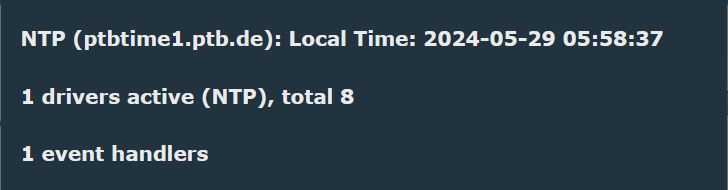
    To be honest, I wasn't, too, and first tried it: At least my LN882H works fine when providing a hostname (even after restart!):
    Screenshot displaying NTP information, including local time and number of active drivers.

    Added after 12 [minutes]:

    By the way: What would you think about registering NTP related commands even before the start of NTP driver?
    If I e.g. want to change NTP server or set offset, I first have to start the driver with "unwanted" values to change them afterwards.
    No problem if doing it scripted, but if entering commands "by hand" the more intuitive way (in my opinion) would be first set parameters, than start the service
  • #14 21099519
    p.kaczmarek2
    Moderator Smart Home
    I'm afraid our standard would not allow that. We're assuming that you need to start driver in order to register the commands, and starting driver in this case starts the service. We could do something like we did for SM16703P, where you have a separate, let's say, "NTP_Start" command within a driver, but we can't really do that without breaking compatibility with older scripts...
    Helpful post? Buy me a coffee.

Topic summary

✨ The discussion revolves around configuring NTP servers for smart plugs running OpenBeken firmware, specifically addressing the challenge of switching between two networks with different NTP servers without manual reconfiguration. The user proposes three potential solutions: setting two NTP servers, using conditional scripting to determine the active network, and leveraging DHCP options for NTP server configuration. Responses highlight the limitations of the current scripting capabilities in OpenBeken, suggest creating a custom driver to achieve the desired functionality, and explore the possibility of using DNS to resolve NTP server addresses dynamically. The conversation also touches on the feasibility of using hostnames for NTP servers and the implications of modifying the existing command structure for better usability.
Generated by the language model.

FAQ

TL;DR: Need OpenBeken plugs to pick the right NTP per network? Use a tiny custom driver to switch it—“like 5 minutes with custom driver.” [Elektroda, p.kaczmarek2, post #21095555] Why it matters: This helps OpenBeken users avoid manual reconfiguration when devices roam across networks with different NTP servers.

Quick Facts

What’s the easiest way to switch NTP servers based on the current network?

Create a tiny custom driver that runs logic in the onEverySecond callback. Read the device’s current network info (e.g., IP string), decide which NTP to use, and set it. This keeps devices hands-off when they move between networks without changing the image. The maintainer shared a driver tutorial and suggested checking the string each second to pick the right server. [Elektroda, p.kaczmarek2, post #21095509]

Does OpenBeken let me set multiple NTP servers for failover?

No. As of now, OpenBeken exposes a single NTP server field, so native multi-server failover is not available. You can still achieve resilience by steering the device to the right server using a custom driver, DNS indirection, or external automation. If you need transparent redundancy, consider handling it in your network (e.g., DNS). [Elektroda, Beken_Call, post #21086155]

Will OpenBeken use the NTP server from DHCP (option 42)?

OpenBeken doesn’t implement DHCP option parsing itself. DHCP is handled by the platform’s Wi‑Fi/DHCP library, outside OpenBeken’s scope. Therefore, do not rely on OBK to honor DHCP NTP options; explicitly set the NTP server in OBK or via automation. If the platform stack exposes NTP, it isn’t documented in OBK. [Elektroda, p.kaczmarek2, post #21095596]

Can I compute “.1 on my subnet” inside an OpenBeken script?

Not with the current scripting. The built-in scripting operates on numbers and lacks the conditional/string handling needed to parse the device IP and assemble a new address. To implement subnet-based logic, use a simple custom driver or trigger an external script to set the NTP server. [Elektroda, p.kaczmarek2, post #21086162]

How do I set the NTP server remotely from my DHCP or controller?

Use the HTTP command endpoint.
  1. Start the NTP driver: http:///cmd_tool?cmd=startDriver NTP
  2. Set the server: http:///cmd_tool?cmd=ntp_setServer
  3. Call these from your DHCP hook or controller (curl/wget) after the device gets an address. This lets your network pick the right NTP without flashing new firmware or touching the device UI. [Elektroda, max4elektroda, post #21095598]

Can I set an NTP server as a hostname, not an IP?

Yes, at least on LN882H builds. A user verified that providing a hostname works and persists across restarts. “Works fine when providing a hostname (even after restart!).” If your environment supports DNS per network, this lets you resolve a local NTP per site without device reconfiguration. [Elektroda, max4elektroda, post #21099376]

Any gotchas with hostname-based NTP in OpenBeken?

A maintainer noted uncertainty about how well all Beken builds handle domain names for NTP servers. If you see sync issues, test with a raw IP to isolate DNS. “I am not sure how good the current Beken code works with domain names instead of IPs of NTP servers.” This is an edge case to watch. [Elektroda, p.kaczmarek2, post #21099371]

Why can’t I change NTP parameters before starting the NTP driver?

OpenBeken registers a driver’s commands when the driver starts, and starting the NTP driver also starts the service. This standard avoids breaking existing scripts. A split “NTP_Start” model is possible, but it would change current behavior. Start the driver first, then set server/offset. [Elektroda, p.kaczmarek2, post #21099519]

Is there a tutorial or sample code to write that custom driver?

Yes. The maintainer shared a detailed sample for building a small driver. Implement logic in onEverySecond to check current network context (e.g., IP string) and set the correct NTP server. This approach keeps your logic simple and self-contained. [Elektroda, p.kaczmarek2, post #21095509]

Can OpenBeken detect which network it’s on if the SSID is identical?

Use a driver to inspect the device’s assigned IP string and map it to a network. Then set the matching NTP server. The onEverySecond hook provides a frequent trigger to keep configuration correct after connect or DHCP renewal. This avoids depending on SSID naming differences. [Elektroda, p.kaczmarek2, post #21095509]

Could I solve this by giving both networks the same NTP IP?

Yes. One pragmatic approach is to re-address networks so the NTP server shares the same IP on both. That removes the need for device-side logic or network scripts. It’s simple, avoids firmware changes, and keeps behavior consistent. [Elektroda, Beken_Call, post #21099314]

Are better scripting features (conditionals, strings) planned?

The maintainer plans to revisit scripting and may add more advanced expressions and/or conditionals. This could eventually make network-aware NTP selection possible without custom drivers. “I will try to look into scripting stuff soon… support more advanced math expressions and/or conditionals.” [Elektroda, p.kaczmarek2, post #21095596]

How often can my driver check and switch NTP if the network changes?

Use the onEverySecond callback. It fires roughly every 1 second, which is fast enough to catch post-association or DHCP events and correct the NTP server. Keep logic lightweight to avoid overhead. Trigger changes only when the network state actually differs. [Elektroda, p.kaczmarek2, post #21095509]
Generated by the language model.
ADVERTISEMENT