logo elektroda
logo elektroda
X
logo elektroda
Dostępna jest polska wersja

Czy wolisz polską wersję strony elektroda?

Nie, dziękuję Przekieruj mnie tam

[BK7231N/CB3S] Mhcozy TYWRA-RF Relay Module (Dry Contact) Configuration & Setup Guide

wassimsarghini 5454 20

TL;DR

  • Mhcozy TYWRA-RF dry-contact relay module with a CB3S chip is the target of this BK7231N/CB3S configuration guide.
  • The relay module was flashed successfully, and a ready-to-use config is shared to save setup time.
  • Brand: Mhcozy; model: TYWRA-RF; chip: CB3S.
Generated by the language model.
ADVERTISEMENT
📢 Listen (AI):
  • Hello everyone,

    First of all thanks to the community.

    I flashed a relay module (dry contact) that uses a CB3S chip

    Brand : Mhcozy
    Model : TYWRA-RF

    I just wanted to share with you the config, in order to save time

    Here is the config:

    [BK7231N/CB3S] Mhcozy TYWRA-RF Relay Module (Dry Contact) Configuration & Setup Guide

    Code: JSON
    Log in, to see the code


    hope this helps someone

    Greeting

    Cool? Ranking DIY
    About Author
    wassimsarghini
    Level 1  
    Offline 
    wassimsarghini wrote 1 posts with rating 3, helped 1 times. Been with us since 2023 year.
  • ADVERTISEMENT
  • #2 20801332
    xinetic
    Level 1  
    Yes thnx this wil help, but now it is just a wifi controlled relais, how can i learn a new RF remote control?
  • ADVERTISEMENT
  • #3 21308294
    fitor
    Level 9  
    xinetic wrote:
    Yes thnx this wil help, but now it is just a wifi controlled relais, how can i learn a new RF remote control?


    Hi, did anyone solve this problem?
    Thanx
  • #4 21308412
    divadiow
    Level 38  
    are you sure RF matching must be done through software? I notice the manual only makes mention of the app method, but my experience with the switches I have with RF capability is that a long-push of one of the button also does the same. Perhaps this is also true of this device?
    Attachments:
    • TYWRA-RF-User-Guide.pdf (476.39 KB) You must be logged in to download this attachment.
  • ADVERTISEMENT
  • #5 21308431
    fitor
    Level 9  
    Hi, I have the instructions manual. But xinetic mentioned that the RF transmitter cannot be learned after flash, so far I relay not flash because I want to keep the RF function. I will try to pick up the Tuya config and will see.

    Dodano po 3 [godziny] 33 [minuty]:

    Hi, i made dump, the result is similar to that from wassimsarghini.
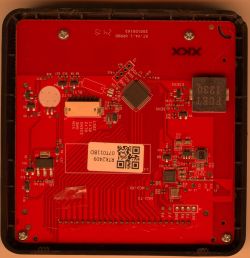
    Identifikation of ICs:
    MB10F rectifier
    XL1509  DC BUCK step-down
    RFE2740  ???
    ?? one without label
    Module: CB3S
    JSON+text:
    {
       "rl1_lv":"1",
       "on_off_cnt":"10",
       "onoff_rst_m":"0",
       "led1_pin":"9",
       "onoff_clear_t":"6",
       "rand_dpid":"42",
       "net_trig":"4",
       "netled1_lv":"0",
       "jv":"100",
       "onoff_rst_type":"2",
       "total_bt_pin":"6",
       "nety_led":"0",
       "total_stat":"0",
       "reset_t":"7",
       "netled1_pin":"8",
       "remote_add_dp":"49",
       "remote_list_dp":"50",
       "net_type":"0",
       "inch_dp":"44",
       "module":"CB3S",
       "ch_cddpid1":"9",
       "onoff1":"14",
       "init_conf":"38",
       "led1_lv":"0",
       "zero_select":"0",
       "onoff_type":"0",
       "series_ctrl":"0",
       "total_bt_lv":"0",
       "cyc_dpid":"43",
       "remote_select":"0",
       "ch_num":"1",
       "rl1_pin":"24",
       "netn_led":"0",
       "ch_dpid1":"1",
       "crc":"85"
    }
    
    Device configuration, as extracted from Tuya: 
    - LED (channel 1) on P9
    - Pair/Toggle All Button on P6
    - WiFi LED on P8
    - TglChannelToggle (channel 1) on P14
    - Relay (channel 1) on P24
    Device seems to be using CB3S module, which is using BK7231N.
    And the Tuya section starts, as usual, at 2023424


    Could you confirm that this configuration enable RF code learning?
    Attachments:
    • readResult_BK7231N_QIO_Tywra_2024-18-11-19-31-41.bin (2 MB) You must be logged in to download this attachment.
  • #6 21309043
    fitor
    Level 9  
    I flashed the relay successfully, it connects to wifi but cannot connect to the web interface :-(
    It's there way to reach settings in another way?
  • ADVERTISEMENT
  • #7 21311074
    fitor
    Level 9  
    Hi, does anyone have experience with this problem.
    The relay has an address assigned to it by the router, but i cannot connect to it after entering the address into the browser. I can change the parameters using UART, but I can't control the relay over wifi.
    Thank you
  • #8 21323485
    GastonL
    Level 4  
    Hi,

    I have the same smart switch. Can you tell me how you flashed it? Did you connect an uart/usb device, and if so, how did you wire it?
  • #9 21324150
    fitor
    Level 9  
    Hi, standard conection via UART, module CB3S:
    PIN1 - CEN
    PIN8 - Vcc
    PIN9 - GND
    PIN15 - RX
    PIN16 - TX
    
    {
    "rl1_lv":"1",
    "on_off_cnt":"10",
    "onoff_rst_m":"0",
    "led1_pin":"9",
    "onoff_clear_t":"6",
    "rand_dpid":"42",
    "net_trig":"4",
    "netled1_lv":"0",
    "jv":"100",
    "onoff_rst_type":"2",
    "total_bt_pin":"6",
    "nety_led":"0",
    "total_stat":"0",
    "reset_t":"5",
    "netled1_pin":"8",
    "remote_add_dp":"49",
    "remote_list_dp":"50",
    "net_type":"0",
    "inch_dp":"44",
    "rf_width":"345",
    "module":"CB3S",
    "ch_cddpid1":"9",
    "remote_io":"26",
    "onoff1":"14",
    "init_conf":"38",
    "led1_lv":"0",
    "zero_select":"0",
    "onoff_type":"0",
    "series_ctrl":"0",
    "total_bt_lv":"0",
    "cyc_dpid":"43",
    "remote_select":"1",
    "ch_num":"1",
    "rl1_pin":"24",
    "netn_led":"0",
    "ch_dpid1":"1",
    "crc":"16"
    }
    
    Device configuration, as extracted from Tuya:
    - LED (channel 1) on P9
    - Pair/Toggle All Button on P6
    - WiFi LED on P8
    - TglChannelToggle (channel 1) on P14
    - Relay (channel 1) on P24
    Device seems to be using CB3S module, which is using BK7231N.
    And the Tuya section starts, as usual, at 2023424

    [/code]

    but be careful, out of 4 relays one is not working RF, like in the second post!!
  • #10 21324278
    GastonL
    Level 4  
    That's how I connected it, but I did not unsoldier the cb3s. I tried to reset through pin 1 (reset) and pin 3 (cen), but without luck.

    Do I have to unsoldier the cb3s for that? I measured voltage over pin  8 and pin 9 after connecting gnd and 3v, but I measure only a 0.7v, so there is a huge voltage drop.
  • #11 21324638
    fitor
    Level 9  
    That's weird. If you have a weak 3V3 power supply on the UART, you can use an external stabilizer.
    But the easiest way is to just connect Rx, Tx and GND and power the relay through its micro USB port.
    You connect the power then the UART, and briefly disconnect and reconnect the USB power when a reset is requested.
  • #12 21325559
    GastonL
    Level 4  
    Your suggestion did help me, but it works differently for me. Steps I did:
    1. wire TX, RX and GND
    2. connect USB/UART to computer
    3. start (windows) BK7231 UART flasher
    4. connect switch to USB for power
    5. shortly wire GND to pin 1 (RST)
    6. disconnect GND

    The results are as below

    note to me: don't swap TX and RX, because that leads to frying a SMD

    Unfortunately, I don't see it come up as an AP neither can I find it on my network when I add wifi credentials. Any flag box I should tick?

    
    {
       "rl1_lv":"1",
       "on_off_cnt":"10",
       "onoff_rst_m":"0",
       "led1_pin":"9",
       "onoff_clear_t":"6",
       "rand_dpid":"42",
       "net_trig":"4",
       "netled1_lv":"0",
       "jv":"100",
       "onoff_rst_type":"2",
       "total_bt_pin":"6",
       "nety_led":"0",
       "total_stat":"0",
       "reset_t":"5",
       "netled1_pin":"8",
       "remote_add_dp":"49",
       "remote_list_dp":"50",
       "net_type":"0",
       "inch_dp":"44",
       "rf_width":"345",
       "module":"CB3S",
       "ch_cddpid1":"9",
       "remote_io":"26",
       "onoff1":"14",
       "init_conf":"38",
       "led1_lv":"0",
       "zero_select":"0",
       "onoff_type":"0",
       "series_ctrl":"0",
       "total_bt_lv":"0",
       "cyc_dpid":"43",
       "remote_select":"1",
       "ch_num":"1",
       "rl1_pin":"24",
       "netn_led":"0",
       "ch_dpid1":"1",
       "crc":"16"
    }


    Device configuration, as extracted from Tuya: 
    - LED (channel 1) on P9
    - Pair/Toggle All Button on P6
    - WiFi LED on P8
    - TglChannelToggle (channel 1) on P14
    - Relay (channel 1) on P24
    Device seems to be using CB3S module, which is using BK7231N.
    And the Tuya section starts, as usual, at 2023424
    
  • #13 21325677
    fitor
    Level 9  
    After flash, choose Read only OBK config, then Change OBK settings and here put wifi SSID and password, then Write only OBK config. For wifi is not necesary to tick any flags.
  • #14 21325907
    GastonL
    Level 4  
    That was easy, but I think I fried the AMS 1117 voltage regulator, because the led is on with a fast flicker, there is no WIFI and there is no response from buttons or relay (the AMS started smoking when I had TX-TX and RX-RX connected).

    So that was it I guess, unless I have a AMS somewhere and that's the only defect component.
  • #15 21325924
    fitor
    Level 9  
    Swapping Tx and Rx will not destroy the chip. You must have switched the polarity of the power supply.
  • #16 21327020
    GastonL
    Level 4  
    I agree that it's unlikely to destroy the chip with swapping Tx and Rx. But it's also unlikely to swap polarity using a USB cable to power the switch. I found a AMS1117 on a step down converter and tried to replace it, but that didn't end well. This project stops for me now. It was fun, but I am going to buy a zigbee switch as a replacement now.
  • #17 21327112
    fitor
    Level 9  
    Didn't you use a 5V power supply instead of 3V3?
  • #18 21327132
    GastonL
    Level 4  
    I used the uart on 3v and the USB is the regular way to power the switch (which is 5v of course). Apart from Tx and Rx I don't think anything was connected wrong. But we will never be sure
  • #19 21624939
    Frajar
    Level 1  
    Guys, how do I set the device so that after pressing the button, the relay turns off after 1 second?
  • #21 21795126
    dlitz
    Level 1  
    I have a similar, 4-channel board made by "Huacaoe" instead of "MHCOZY", and I've been working on replacing its firmware with ESPHome. It has the RFE2740DM chip, which has 1 wire connected to the radio transceiver chip (WL520) and 4 wires connected in parallel to each of the buttons. To program it, you apparently hold the button for 3 seconds until a blue LED turns on, and then press the button on the remote. Neither the RFE2740DM nor the WL520 appears to have any connection to the CB3S module except through those 4 button-press GPIOs.

    I haven't gotten out an oscilloscope yet to confirm and I don't have any 433MHz remotes, but based on the way it is wired, I don't think the CB3S MCU has any way to control the RF function; decoding and learning appears to be done entirely by the RFE2740, which is apparently designed to simulate the corresponding button-press when it receives the RF code that it has learned.
📢 Listen (AI):

Topic summary

✨ The discussion centers on the Mhcozy TYWRA-RF relay module featuring a BK7231N chip and CB3S board, focusing on its configuration, flashing process, and RF remote learning capabilities. The original poster shared a JSON configuration for the dry contact relay module with 5V USB power and 433MHz RF. Users report successful flashing via UART with pin connections (CEN, Vcc, GND, RX, TX) and powering through the micro USB port. Challenges include inability to connect to the web interface despite obtaining an IP address, and issues with learning new RF remotes after flashing, as the RF transmitter may not be programmable post-flash. Some users experienced hardware failures, notably damage to the AMS1117 voltage regulator due to incorrect UART wiring or power polarity mistakes. Recommendations include powering the device via USB while connecting UART lines, careful wiring to avoid swapping TX and RX lines, and using the BK7231 UART flasher tool to write WiFi credentials without setting additional flags. The discussion also touches on the possibility that RF pairing might be done via long button presses rather than software. Due to hardware risks and complexity, some users consider switching to Zigbee alternatives.
Generated by the language model.

FAQ

TL;DR: CB3S-based TYWRA-RF modules pull a peak 80 mA during Wi-Fi TX (Tuya CB3S datasheet). “After flash, choose Read only OBK config” [Elektroda, fitor, post #21325677] Follow the 3.3 V UART-flash → OBK-config → RF-learn steps to keep both Wi-Fi and 433 MHz control.

Why it matters: One wrong jumper or 5 V feed fries the AMS1117 regulator and kills the relay.

Quick Facts

• Supply voltage: 3.3 V UART, 5 V micro-USB for load side [Elektroda, fitor, post #21324638] • Peak Wi-Fi current: 80 mA, average 46 mA (CB3S datasheet) • RF carrier: 433.92 MHz, pulse width ≈ 345 µs [Elektroda, Dump, post #21324150] • Flashing time with BK7231 GUI: ≤ 90 s typical [Elektroda, GastonL, post #21325559] • AMS1117 regulator max dissipation 1 W @ 25 °C (AMS1117 datasheet)

Does flashing OpenBK7231C remove the 433 MHz RF learning feature?

No. Keep the Tuya RF parameters (remote_add_dp, remote_list_dp, rf_width, remote_io) in the JSON. When they stay intact, the long-press on P6 still enters RF-learn mode [Elektroda, fitor, post #21324150]

How do I teach the relay a new RF remote after flashing?

  1. Hold the on-board button (P6) for >5 s until the LED blinks fast.
  2. Press the desired RF key twice within 10 s.
  3. LED turns steady—code stored in flash [Elektroda, divadiow, post #21308412]

Why can’t I open the web interface even though the module gets an IP?

The OBK image without WEB flag blocks port 80. Re-flash with a WEB build or enable WEB via UART using ‘setEnableWeb 1’ then ‘restart’ [Elektroda, fitor, post #21311074]

What UART pins do I need on the CB3S module?

Connect RX (pin 15), TX (pin 16), GND (pin 9). Optionally pull CEN (pin 1) low for reset. Power can stay on the board’s micro-USB [Elektroda, fitor, post #21324150]

Safe flashing procedure in 3 steps?

  1. Wire RX–TX, TX–RX, GND; power via USB.
  2. Start BK7231 Flasher, click ‘Start’.
  3. Momentarily short GND to pin 1 (RST) to enter boot, then release; flash completes in ≈90 s [Elektroda, GastonL, post #21325559]

What causes the AMS1117 regulator to smoke?

Feeding 5 V to the 3.3 V rail or shorting TX-RX directly to USB 5 V overloads the AMS1117, which can dissipate only 1 W max [AMS1117 datasheet; Elektroda, GastonL, #21325907].

Will swapping TX and RX lines damage the board?

No. Logic-level cross-connection merely prevents communication; it does not push reverse polarity or over-voltage [Elektroda, fitor, post #21325924]

Typical current draw in deep-sleep?

CB3S deep-sleep current is approx. 20 µA, extending battery lifetimes in sensor designs [Tuya CB3S datasheet].

Edge case: One of four relays lost RF after flashing—why?

A corrupted RF parameter block at offset 0x2023424 disables the 433 MHz ISR. Restore the JSON from a working dump or set ‘remote_select 1’ via UART and reboot [Elektroda, fitor, post #21324150]

How many RF codes can the module store?

Up to 10 rolling-code entries are stored in flash, matching the ‘on_off_cnt’ JSON parameter [Elektroda, Dump, post #21308431]

Can I power the CB3S directly from 5 V?

No. Feed 5 V only to the on-board AMS1117 input. The CB3S core must see 3.3 V; exceeding 3.6 V risks permanent damage [AMS1117 datasheet].
Generated by the language model.
ADVERTISEMENT