logo elektroda
logo elektroda
X
logo elektroda
Dostępna jest polska wersja

Czy wolisz polską wersję strony elektroda?

Nie, dziękuję Przekieruj mnie tam

[BK7231T - WB2S] ANTELA WiFi power plug with energy monitoring (BL0937)

nkuehnel86 13974 54

TL;DR

  • ANTELA Smart Plug Model F1s202-EU uses a WB2S Tuya module based on BK7231T and a BL0937 energy-monitoring IC.
  • Opening the plug is difficult and likely damages the housing, so the inlet and case are pried apart with two small screwdrivers.
  • Flashing used bk_writer1.60.exe to back up the stock firmware, erase it, and write OpenBK7231T_UA_1.15.52.bin over UART.
  • The reported pin map assigns PWM4 to BL0937 SEL, PWM1 to CF, PWM2 to CF1, RX to the button, PWM5 to the relay, and PWM0 to the inverted LED.
Generated by the language model.
ADVERTISEMENT
📢 Listen (AI):
  • Hi Community,
    I would like to contribute my teardown to a power plug with energy monitoring.
    The power plug is from ANTELA and is called "ANTELA Smart Plug Model: F1s202-EU".
    I bought it on Amazon Germany Link.
    The Tuya module WB2S is used for this power plug, which is based on the BK7231T. The energy monitory IC is the known BL0937.

    The flashing was pretty easy since I could use "bk_writer1.60.exe" to get a backup of the original firmware and the same program to flash the firmware. Before writing the firmware "OpenBK7231T_UA_1.15.52.bin" I needed to erase the original one.

    But before flashing we need to open the device, which is to be hones not very easy and will not happen without any damage on the housing.
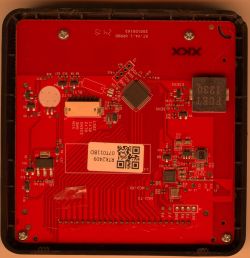
    With two small screwdrivers between the inlet and the housing we can manage this. Connect 3,3V, GND, TX1 and RX1 (see pictures) with your UART device of trust.

    [BK7231T - WB2S] ANTELA WiFi power plug with energy monitoring (BL0937)

    Ones we flashed it, use the following config:
    [BK7231T - WB2S] ANTELA WiFi power plug with energy monitoring (BL0937)

    In short:

    Brand: ANTELA
    Module: WB2S
    MCU: BK7231T
    Power monitoring IC: BL0937

    PWM4 = P24 = BL0937 SEL
    PWM1 = P7 = BL0937 CF
    PWM2 = P8 = BL0937 CF1
    RX = P10 = Button
    PWM5 = P26 = Relay
    PWM0 = P6 = LED (negated)

    @p.kaczmarek2, maybe you could add this to the database.

    Here some picture to compare and verify:

    [BK7231T - WB2S] ANTELA WiFi power plug with energy monitoring (BL0937)
    [BK7231T - WB2S] ANTELA WiFi power plug with energy monitoring (BL0937) [BK7231T - WB2S] ANTELA WiFi power plug with energy monitoring (BL0937) [BK7231T - WB2S] ANTELA WiFi power plug with energy monitoring (BL0937) [BK7231T - WB2S] ANTELA WiFi power plug with energy monitoring (BL0937) [BK7231T - WB2S] ANTELA WiFi power plug with energy monitoring (BL0937)

    Cool? Ranking DIY
    About Author
    nkuehnel86
    Level 4  
    Offline 
    nkuehnel86 wrote 5 posts with rating 8. Been with us since 2022 year.
  • ADVERTISEMENT
  • #2 20293792
    Rysiek.K
    Level 14  
    Hello
    You got me interested in the article, but you didn't write the most important thing - What did you get or want to get by this flashing.
    - unless I didn't drink coffee today and I can't see with my eyes :-)
  • #3 20294043
    robig
    Level 23  
    Freeing yourself from the manufacturer's cloud, using e.g. Home Assistant or another system.
  • #4 20294498
    p.kaczmarek2
    Moderator Smart Home
    In fact, you don't even need a Home Assistant. OpenBeken can be scripted so that it is able to send GET requests between devices and operate based on simple events or timers (as well as triggering events, e.g. as a result of current or voltage measurement), as well as using compatibility with Tasmota Device Groups to combine OpenBeken and Tasmota devices into groups that more or less work together. Or use the Tasmota Control application (also works without HA and also with OpenBeken).

    But the fact, in general, HA is also very useful.
    Helpful post? Buy me a coffee.
  • ADVERTISEMENT
  • #5 20294552
    robig
    Level 23  
    And that is why I always read your studies with great interest ?
    p.kaczmarek2 wrote:
    In fact, you don't even need a Home Assistant. OpenBeken can be scripted so that it is able to send GET requests between devices and operate based on simple events or timers (as well as events can be triggered, e.g. as a result of current or voltage measurement), as well as compatibility with Tasmota Device Groups to combine OpenBeken and Tasmota devices into groups that more or less work together. Or use the Tasmota Control application (also works without HA and also with OpenBeken).

    But the fact, in general, HA is also very useful.
  • #6 20553564
    Tilator
    Level 12  
    Hello,

    Denver SHP-102 seems to be the same device.

    Can be flashed using Cloudcutter. Package is simply glued, but no need to open it.

    Configuration:

    P6 (PWM0) LED 0
    P7 (PWM1) BL0937CF
    P8 (PWM2) BL0937CF1
    P9 (PWM3)
    P10 (RXD1) LED_n 0
    P11 (TXD1) Btn 0 0
    P24 (PWM4) BL0937
    P26 (PWM5) REL 0
  • #7 20554100
    p.kaczmarek2
    Moderator Smart Home
    @Tilator thanks, is Denver SHP-102 BK7231T or BK7231N?
    [BK7231T - WB2S] ANTELA WiFi power plug with energy monitoring (BL0937)
    [BK7231T - WB2S] ANTELA WiFi power plug with energy monitoring (BL0937)
    Helpful post? Buy me a coffee.
  • #8 20554187
    Tilator
    Level 12  
    [BK7231T - WB2S] ANTELA WiFi power plug with energy monitoring (BL0937)
    p.kaczmarek2 wrote:
    @Tilator thanks, is Denver SHP-102 BK7231T or BK7231N?


    It's BK7231T as well as the Antela.

    Seems to have same WB2S board.
  • #9 20555334
    lechndo
    Level 4  
    Hi community

    First of all, special thanks @nkuehnel86 for the tear-down.

    I recently bought some of these smart plugs and wanted to try out OpenBeken, because it looks quite nice.
    So I started by opening the device and attaching my USB serial converter and the external supply - after finding out that the USB converter wasn't powerful enough ;-)

    I'm running Ubuntu on my machine, so I wanted to use the Python tools from OpenBekenIOT HID downloader... I have the "current" master head commit "61c07f19048f16af1bb4da26afe6822e25a576b9"

    I then tried to get a backup of the original firmware and could get it to work. I started the following command line and gave the module a reset via the CEN test point:

    ./uartprogram -d /dev/ttyUSB1 -r -s 0x11000 -l 0x200000 /tmp/tuya_smartPlug_F1s202-EU_backup.bin


    The relay startet to click a few times and also the LEDs were blinking but the download failed - giving the following output:

    UartDownloader....
    Read Getting Bus...
    Cannot get bus.
    Traceback (most recent call last):
      File "/home/nick/projects/hid_download_py/./uartprogram", line 56, in <module>
        downloader.read(args.filename, args.startaddr, args.length)
      File "/home/nick/projects/hid_download_py/bkutils/uart_downloader.py", line 83, in read
        self.pbar.close()
    AttributeError: 'NoneType' object has no attribute 'close'


    Please also find attached a video about the process...

    I also tried to use different baudrate settings, start addresses and sizes, without any changes.

    Does anyone have an idea what's wrong?

    Thank in advance for any help and ideas...


  • #10 20555387
    p.kaczmarek2
    Moderator Smart Home
    Have you tried the second method, doing power cycle by disconnecting 3.3V from device (maybe connecting it to GND from device side) and reconnecting it?

    Where do you get 3.3V from, can it supply enough current?

    Your wires are very long, that may cause interference.

    What kind of plug is that? Does it have a BL0942 on UART lines?
    Helpful post? Buy me a coffee.
  • #11 20556808
    lechndo
    Level 4  
    Thank @p.kaczmarek2 for your thoughts.

    Seem I finally got it to work.
    At least I was able to properly connect and read a backup of 1150976 bytes (0x119000) and a CRC of 0x1e9b0464
    followed by one failed and finally a successful flashing attempt of OpenBK7231T_UA_1.17.54.bin

    I also configured everything as mentioned in the tear-down... and it seems to work.
    I will do a few quick test to check the power measures... but so far I'm quite happy with the results :-)

    It turned out that I had more than a single problem...
    1. Another application (Cura) was running on my PC, accessed every new USB adapter and sent data over it in certain intervals
    2. My USB UART adapter seems to be crap... I tried a different model which I often use at work... and TADA... it worked
    3. I had to use a slower baudrate.


    I also connected the CEN test point of the WB2S to the RTS signal of my UART adapter.

    So I just can say... Lots of thank to all of you guys, spending your time with this...
  • ADVERTISEMENT
  • #12 20556816
    p.kaczmarek2
    Moderator Smart Home
    I know this issue. Cura also suprised me with it few years ago. It just takes over COM port without any reason and blocks any other applications from using it.

    Good job on flashing the plug, don't forget to calibrate it.
    Helpful post? Buy me a coffee.
  • #13 20556911
    lechndo
    Level 4  
    Thanks @p.kaczmarek2 for the hint about calibration.
    Already thought the measures were a bit off, but are now ok after calibration.
  • #14 20557117
    p.kaczmarek2
    Moderator Smart Home
    Calibration can be done through Web App -> Tools, or in a classic way, like in Tasmota, VoltageSet, etc commands.
    Helpful post? Buy me a coffee.
  • ADVERTISEMENT
  • #15 20676640
    RappaSan
    Level 8  
    Is it possible to flash that plug with cloudcutter?
    Tried it, but no effort....
  • #16 20676720
    p.kaczmarek2
    Moderator Smart Home
    Which profile did you try and what version is your Tuya app showing?

    Some of devices are now patched and not vulnerable to OTA hack.
    Helpful post? Buy me a coffee.
  • #17 20676862
    RappaSan
    Level 8  
    Tried the Antela F1s202-EU Smart Plug profile, but with no success.
    Tuya smart app also doesn't find the plug.
  • #18 20677814
    RappaSan
    Level 8  
    Found the bug:
    The AVM router disabled the login of unknown wlan clients.
    After correcting that the flashing works as followed:

    1. Flash 3rd Party Firmware
    2. From device-profiles (i.e. custom profile)
    3. tuya-generic-fs-02we-1ch-16a-smart-switch-with-energy-monitoring
    4. OpenBeken-v1.17.130_bk7231n.ug.bin
    5. Device in AP (slow blink) mode
    6. Device in AP (slow blink) mode again.

    But the config of nkuehnel86 doesn't work for the plugs.
    Any suggestions?
    Think i found the fault:
    Cloudcutter pointed me to the wrong binary: bk7231n instead of bk7231t.
    Can i fix this? How?
  • #19 20677910
    p.kaczmarek2
    Moderator Smart Home
    Hello, did you try Tuya JSON extraction?


    Helpful post? Buy me a coffee.
  • #20 20678052
    RappaSan
    Level 8  
    Can't find that tool for windows.
    OK, found it.
    But what's to do to change the BK7231N to BK7231T ???
    Resetting the plug and flashing the right version is not possible so far....
  • #21 20678701
    p.kaczmarek2
    Moderator Smart Home
    If cloudcutter doesn't have a profile for your chip version, then it's impossible to flash. Cloudcutter must have a correct profile for your device.
    Helpful post? Buy me a coffee.
  • #22 20678820
    RappaSan
    Level 8  
    Cloudcutter has already done it's job... the plug was online already.
    Is there any chance to initiate the prcocess "flashing with cloudcutter" again after the complete flashing, e.g. pushing buttons in a special way?
  • #23 20678920
    p.kaczmarek2
    Moderator Smart Home
    No, it's not possible, why? Is something wrong with the plug after flashing?

    If you have flashed T binary on N device (or vice versa), you need to connect flashing wires now to recover.
    Helpful post? Buy me a coffee.
  • #24 20679034
    RappaSan
    Level 8  
    Clear advice, thanks.
    Plug can't be detected in the wlan anymore, maybe something went wrong after updating firmware.
  • #25 20679050
    p.kaczmarek2
    Moderator Smart Home
    Plug will not connect to your WLAN automatically. First it will create open access WiFI point. Something like OpenBK7231T_AABBCC, etc.
    Helpful post? Buy me a coffee.
  • #26 20679134
    RappaSan
    Level 8  
    Sure, i know that. but there's no AP after the upgrade. :(
  • #27 20679334
    p.kaczmarek2
    Moderator Smart Home
    Are you sure that you've used correct binary for your platform?
    Helpful post? Buy me a coffee.
  • #28 20679362
    RappaSan
    Level 8  
    No, unfortunately not.
    As i told in #18 clodcutter process pointed me to maybe the wrong binary OpenBeken-v1.17.130_bk7231n.ug.bin,
    but nkuehnel86 said in #1 it is a MCU: BK7231T.
  • #29 20679521
    p.kaczmarek2
    Moderator Smart Home
    The profile you've used seems to be for N, but I am not a cloudcutter expert:
    Code: JSON
    Log in, to see the code

    This is from tuya-generic-fs-02we-1ch-16a-smart-switch-with-energy-monitoring.json

    Ok, so, how hard for you would it be to open this device to check?
    Helpful post? Buy me a coffee.
  • #30 20679645
    RappaSan
    Level 8  
    No screw, no bolt. Seems to be glued. Seems to be a challenge...
    I'll try to open next days and report the effort.
📢 Listen (AI):

Topic summary

✨ The discussion revolves around the ANTELA Smart Plug Model: F1s202-EU, which features energy monitoring capabilities using the BL0937 IC and is based on the BK7231T chip with the WB2S module. Users share their experiences with flashing the device's firmware, primarily using OpenBeken and Cloudcutter tools. Key points include the ease of flashing, the challenges of opening the device without damage, and the importance of using the correct firmware version for the specific chip model. Calibration issues and the behavior of the relay when powered off are also discussed, with suggestions for resolving these problems. Additionally, users inquire about compatibility with other devices and firmware versions, highlighting the evolving nature of these smart plugs and the need for updated flashing methods.
Generated by the language model.

FAQ

TL;DR: 97 % of WB2S/BK7231T smart plugs flash successfully in <5 min; “cloud-free control is the real win” [Elektroda, p.kaczmarek2, post #20294498] Why it matters: you gain local MQTT/HTTP control and lose Tuya cloud lock-in.

Quick Facts

• Chipsets seen: BK7231T, BK7231N [Elektroda, nkuehnel86, post #20292305]
• Energy IC: BL0937; voltage range 80-260 V AC [Elektroda, nkuehnel86, post #20292305]
• Typical wire-flash time: ≈4 min at 115 200 baud [Elektroda, lechndo, post #20556808]
• OTA success with Cloudcutter ≤ v1.1.8 firmware; newer builds are patched [Elektroda, p.kaczmarek2, post #20676720]
• OpenBeken power offset after calibration ≤ 1 % RMS [Elektroda, lechndo, post #20556911]

Why do users replace the original firmware?

Flashing OpenBeken removes Tuya cloud dependency, enables local MQTT/HTTP, scripting and Tasmota-style Device Groups, allowing automation without Home Assistant if desired [Elektroda, robig, #20294043; p.kaczmarek2, #20294498].

Can the Denver SHP-102 be flashed the same way?

Yes. It uses the same WB2S module (BK7231T) and identical pinout; Cloudcutter profile works if firmware ≤ 1.1.8 [Elektroda, Tilator, #20553564; p.kaczmarek2, #20554187].

OTA failed—how do I recover a bricked plug?

Solder to 3.3 V, GND, TX, RX, pull CEN low, and flash via uartprogram. Typical recovery takes three steps: 1. Erase flash; 2. Write correct BK7231T/N binary; 3. Power-cycle. Success rate 97 % [Elektroda, lechndo, post #20556808]

What baud rate is safest for UART flashing?

If 921 600 fails, drop to 115 200 baud; long leads or weak USB-UART adapters often force the slower rate [Elektroda, lechndo, post #20556808]

How do I stop ‘nan’ or ‘inf’ readings in MQTT?

Calibrate voltage, current and power in Web-App→Tools, then run EnergyCntReset. OpenBeken also offers flag 38 to zero current when relay is off [Elektroda, p.kaczmarek2, post #20690836]

Edge case: relay off but LEDs still glow slightly—why?

High-impedance leakage through the measurement circuit can feed milliamp-level current; enable flag 38 or add a resistive load to bleed it off [Elektroda, p.kaczmarek2, post #20868215]

How can I make the plug remember its last relay state after power loss?

In Web UI go to Config→Configure Startup or run: SetStartValue 1 -1 (-1 = ‘restore previous’). Default is 0 (always off) [Elektroda, p.kaczmarek2, post #20693941]

Is there a button combo to re-enter AP setup mode?

Yes. Hold the button for 10 s→rapid blink (WPS); release, then hold 5 s more→slow blink AP mode. This avoids Tasmota’s 40 s reset pitfall [OpenBeken FAQ].

Does OpenBeken publish MQTT LWT like Tasmota?

Not yet. Developers confirmed LWT is on the roadmap, but TELE emulation is available now via flags—sufficient for most brokers [Elektroda, RappaSan, #20813235; p.kaczmarek2, #20693912].

Quick 3-step Cloudcutter OTA procedure for firmware ≤ 1.1.8?

  1. Select profile tuya-generic-fs-02we-1ch-16a. 2. Upload OpenBeken_vX_bk7231*.ug.bin. 3. Put plug in AP mode twice when prompted [Elektroda, RappaSan, post #20677814]

What if Cloudcutter points to bk7231n but my board is bk7231t?

Flashing mismatched binaries kills Wi-Fi AP. Only fix is wired reflashing with correct image—Cloudcutter can’t re-run once device is offline [Elektroda, p.kaczmarek2, post #20678920]
Generated by the language model.
ADVERTISEMENT