







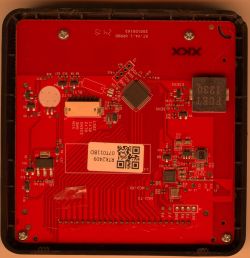

Successor of https://templates.blakadder.com/jinvoo_SM-AW502A.html. Has a BK7231N (CB3S) chip that can be flashed. I bought it from Amazon for 10€ (https://www.amazon.de/dp/B07VYWN88F?tag=tasmotatempla-21)
![[BK7231N] - Jinvoo AC/TV Box IR Controller (SM-AW502S)](https://obrazki.elektroda.pl/7158008800_1667746633_thumb.jpg "[BK7231N] - Jinvoo AC/TV Box IR Controller (SM-AW502S)")
Teardown
1. Remove the rubber feet on the bottom
![[BK7231N] - Jinvoo AC/TV Box IR Controller (SM-AW502S)](https://obrazki.elektroda.pl/1976518200_1667746638_thumb.jpg "[BK7231N] - Jinvoo AC/TV Box IR Controller (SM-AW502S)")
2. Open the screws and open the case
![[BK7231N] - Jinvoo AC/TV Box IR Controller (SM-AW502S)](https://obrazki.elektroda.pl/4874337400_1667746635_thumb.jpg "[BK7231N] - Jinvoo AC/TV Box IR Controller (SM-AW502S)")
Flashing
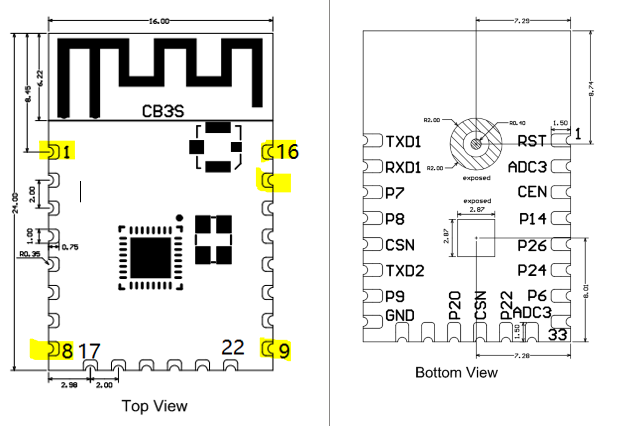
1. Connect the following PINs of the CB3S to your FTDI
![[BK7231N] - Jinvoo AC/TV Box IR Controller (SM-AW502S)](https://obrazki.elektroda.pl/9533122100_1667746639_thumb.jpg "[BK7231N] - Jinvoo AC/TV Box IR Controller (SM-AW502S)")
2. Download the firmware OpenBK7231N_QIO_X.Y.Z.bin from the releases.
3. Follow the flashing instructions in the OpenBK wiki. After issuing the uartprogram command short the PIN 1 of the CB3S to GND on the FTDI.
Configuration
0. Disconnect the wires and plug in the device.
1. You'll see an OpenBK7231N_####### wifi network. Connect and configure the device to connect to your home network.
2. Find the device's IP in your home network. The devices don't seem to have a unique MAC address, if you have multiple, make sure to set unique names and MACs in the configuration.
3. Go to the web application and configure the PINs in the "Config" tab as follows:
4. In the "Logs" tab, run the command startdriver IR
Now when you point a remote at the device where the "DIY" is written you should see the IR Protocol and code inside the logs. To send IR commands, you can run IRSend <PROTOCOL>-<ADDRESS>-<COMMAND>-<REPEAT>, e.g. IRSend RC5-0x0-0x54-1 inside the console or also via MQTT cmnd/<device>/IRSend with payload RC5-0x0-0x54-1.
![[BK7231N] - Jinvoo AC/TV Box IR Controller (SM-AW502S)](https://obrazki.elektroda.pl/7158008800_1667746633.jpg "[BK7231N] - Jinvoo AC/TV Box IR Controller (SM-AW502S)")
Teardown
1. Remove the rubber feet on the bottom
![[BK7231N] - Jinvoo AC/TV Box IR Controller (SM-AW502S)](https://obrazki.elektroda.pl/1976518200_1667746638.jpg "[BK7231N] - Jinvoo AC/TV Box IR Controller (SM-AW502S)")
2. Open the screws and open the case
![[BK7231N] - Jinvoo AC/TV Box IR Controller (SM-AW502S)](https://obrazki.elektroda.pl/4874337400_1667746635.jpg "[BK7231N] - Jinvoo AC/TV Box IR Controller (SM-AW502S)")
Flashing
1. Connect the following PINs of the CB3S to your FTDI
| CB3S PIN | FTDI PIN | Note | 1 (RESET) | Short to GND for 1s after issuing the flashing command below | 8 (VCC) | VCC | DC 3.3v! | 9 (GND) | GND | 15 (RX) | TX | 16 (TX) | RX |
![[BK7231N] - Jinvoo AC/TV Box IR Controller (SM-AW502S)](https://obrazki.elektroda.pl/9533122100_1667746639.jpg "[BK7231N] - Jinvoo AC/TV Box IR Controller (SM-AW502S)")
2. Download the firmware OpenBK7231N_QIO_X.Y.Z.bin from the releases.
3. Follow the flashing instructions in the OpenBK wiki. After issuing the uartprogram command short the PIN 1 of the CB3S to GND on the FTDI.
Configuration
0. Disconnect the wires and plug in the device.
1. You'll see an OpenBK7231N_####### wifi network. Connect and configure the device to connect to your home network.
2. Find the device's IP in your home network. The devices don't seem to have a unique MAC address, if you have multiple, make sure to set unique names and MACs in the configuration.
3. Go to the web application and configure the PINs in the "Config" tab as follows:
| PIN | Type | 6 | Btn | 7 | IRRecv | 8 | WifiLED | 26 | IRSend |
4. In the "Logs" tab, run the command startdriver IR
Now when you point a remote at the device where the "DIY" is written you should see the IR Protocol and code inside the logs. To send IR commands, you can run IRSend <PROTOCOL>-<ADDRESS>-<COMMAND>-<REPEAT>, e.g. IRSend RC5-0x0-0x54-1 inside the console or also via MQTT cmnd/<device>/IRSend with payload RC5-0x0-0x54-1.
Cool? Ranking DIY
![[BK7231N] - Jinvoo AC/TV Box IR Controller (SM-AW502S)](https://obrazki.elektroda.pl/1199805800_1668694542.png "[BK7231N] - Jinvoo AC/TV Box IR Controller (SM-AW502S)")
